Conversion Funnel Tracking: A Complete Guide to Funnel Analysis
Conversion funnel tracking and funnel analysis, step by step: define steps, calculate drop-off, segment, and use session replays to find why users leave.
Conversion Funnel Tracking: A Complete Guide to Funnel Analysis
Your traffic chart is climbing. Your revenue chart is flat. Somewhere between "someone arrived" and "someone paid", people are quietly leaving, and nothing in a pageview report tells you where. Conversion funnel tracking is how you find that place. It turns a vague sense that "the site isn't converting" into a specific, fixable fact: this step, this segment, this many people.
This guide covers funnel analysis end to end. You will learn what a funnel is, how to define steps that mean something, how to calculate step and overall conversion, how to segment, and how to pair the numbers with session recordings so you learn why people drop, not only where. It finishes with funnel templates for SaaS signup, ecommerce checkout, and lead generation.
Photo: Unsplash.
TL;DR
- A funnel is an ordered list of steps toward one goal. Funnel analysis measures how many people reach each step.
- Define the goal first, then pick 3 to 7 steps that are real checkpoints. Use page, event, or CSS-selector conversions depending on what the step is.
- Step conversion tells you where the leak is. Overall conversion tells you whether you are winning. Track both.
- Numbers show where people leave. Session recordings and heatmaps show why. Always do both.
- Change one thing at a time, then re-measure the same step for the same segment.
What Is a Conversion Funnel?
A conversion funnel is a sequence of steps a visitor takes to complete a goal: a purchase, a signup, a demo request, a download. It is called a funnel because each step has fewer people than the one before. Some visitors leave, some get distracted, some were never going to buy.
For an online store the path might be product page, add to cart, begin checkout, payment, order confirmation. For a SaaS product it might be pricing page, signup form, email verification, first project created.
Funnel analysis is the practice of counting how many people make it from each step to the next and then asking what is different about the ones who didn't. Two numbers do most of the work:
- Step conversion: of the people who reached step N, what share reached step N+1?
- Overall conversion: of the people who entered the funnel, what share completed it?
Zero drop-off is not the goal. Plenty of visitors are researching, comparing, or in the wrong place. The goal is to separate the drop-off you can fix (a broken coupon field, a surprise fee, a button that sits below the fold on phones) from the drop-off you can't.
Funnels are one part of a bigger picture. If you want the wider view of how people move through your site, see our guide to user journey mapping with analytics. A funnel is the narrow, measurable slice of that journey that ends in revenue.
How Conversion Funnel Tracking Works
A funnel tracker records the events that make up each step, then groups them by visitor or session and checks whether the steps happened. A visitor who viewed the pricing page, started the signup form, and then left is counted in steps one and two but not three.
That means a funnel is only as good as its step definitions. A step should be something your analytics can observe reliably, and it should represent a meaningful checkpoint, not a convenient-to-measure click.
Page, event, and selector steps
Seentics supports three kinds of conversions for goals and funnel steps, per the project README: page, event, or CSS-selector conversions. Choosing the right type for each step is the most important setup decision you will make.
| Step type | What it matches | Use it when | Example |
|---|---|---|---|
| Page | A visit to a URL | The step is a distinct page | /pricing, /checkout/shipping, /thank-you |
| Event | A custom event your code sends | The step happens without a page change, or you need properties like value | seentics.track('signup_click') |
| CSS selector | A click on an element that matches a selector | You can't or don't want to change the site's code | #start-trial-button |
A few practical notes on choosing between them:
- Use pages for confirmations. A "thank you" or "order confirmed" URL is the cleanest final step because it is hard to reach by accident.
- Use events for things that don't change the URL. Single-page apps, modals, and multi-step forms that never change the address bar are better tracked with events. In Seentics that is a one-liner:
seentics.track('signup_click'), optionally with properties. Revenue events can carryvalueandcurrency, as inseentics.track('purchase', { value: 49.99, currency: 'USD', order_id: 'ORD-1234' }). - Use selectors when you can't touch the code. If a marketer owns the landing page and you can't ship tracking changes, a selector conversion on the CTA button gets you a step without a deploy.
- Mix freely. A single funnel can start with a page, continue with a selector, and end with an event.
Goals themselves are configured in the dashboard rather than in code, per the README, so a funnel can reuse the same definitions as your conversion goals.
How to Define Funnel Steps That Are Useful
Most broken funnels are broken at the definition stage. Here is the process that avoids the common failures.
Start with the goal, not a page
Write down the single conversion you care about: paid subscription, completed order, booked demo. Then work backwards through what a person must do to get there. Add a step only if it is a real checkpoint, meaning that failing to pass it means failing to convert. Don't add steps because they are easy to track.
Keep it between three and seven steps
Fewer than three steps tells you little: "visited, converted" has no diagnostic power. More than seven and the funnel turns into a wall of numbers where every step has a different owner and no one acts. If you genuinely have a long flow, build one funnel per phase, such as acquisition-to-signup and signup-to-activation, rather than one giant funnel.
Make steps observable and unambiguous
Ask of each step: if this fires, did the visitor definitely do the thing? A pageview of /checkout means they reached checkout. A click on a "Buy" button that might open a validation error does not necessarily mean they succeeded. Prefer the signal that sits after the action, not before it.
Decide on ordering and time window
Real journeys are messy. Someone may read the pricing page three times before signing up. Decide in advance whether your funnel treats steps as strictly sequential and what window you allow between the first and last step. A window that is too short undercounts slow deciders, and one that is too long counts a visit from last month as part of today's journey. Whatever you choose, keep it consistent so that before and after comparisons are fair.
Reading a Funnel: A Diagram With Illustrative Numbers
Here is what a funnel looks like once the steps are tracked. The numbers below are illustrative, invented to show how to read the shape, not benchmarks from any real site.
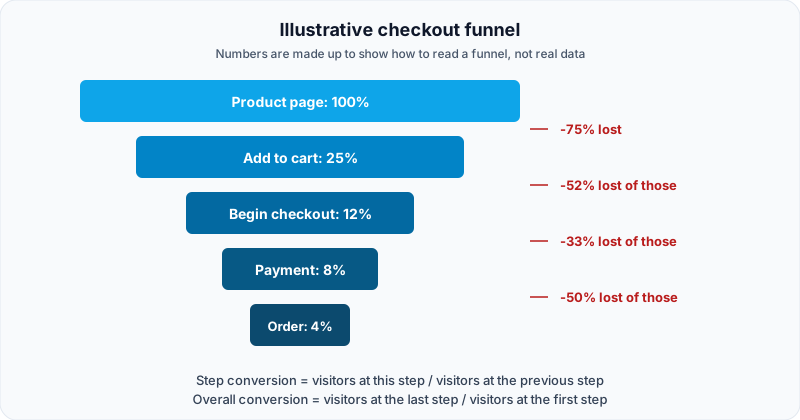
Illustrative funnel for a hypothetical store. Percentages are relative to the first step.
Reading it from the top:
- Out of every 100 people who view a product page, 25 add something to the cart. Three quarters leave. That is normal for a top-of-funnel step, because many people are just browsing.
- Of those 25, 12 begin checkout. Roughly half drop between cart and checkout.
- Of the 12 who begin checkout, 8 reach payment, so a third drop.
- Of the 8 who reach payment, 4 complete the order, which is another 50% loss.
Notice that the largest percentage drop (the first step) is not necessarily the one most worth fixing. Losing half of the people who already put something in a cart and typed in their details is usually more painful, and often more fixable, than losing browsers at the top. Which leaks to prioritise is exactly what the next section helps you calculate.
How to Calculate Funnel Conversion Rates
You need only two formulas.
Step conversion rate = visitors at this step / visitors at the previous step
Overall conversion rate = visitors at the final step / visitors at the first step
Drop-off is just the inverse: drop-off = 1 minus step conversion.
A worked example (hypothetical)
Suppose a hypothetical SaaS site tracks a signup funnel over one week. These numbers are invented for the example.
| Step | Visitors | Step conversion | Drop-off |
|---|---|---|---|
| 1. Landing page view | 10,000 | n/a | n/a |
| 2. Clicked "Start free trial" | 3,000 | 30% (3,000 / 10,000) | 70% |
| 3. Submitted signup form | 2,100 | 70% (2,100 / 3,000) | 30% |
| 4. Verified email | 1,470 | 70% (1,470 / 2,100) | 30% |
| 5. Created first project | 735 | 50% (735 / 1,470) | 50% |
Overall conversion is 735 / 10,000 = 7.35%.
The biggest percentage drop is step 2 (70% leave), but that is a landing-page question heavily influenced by traffic quality. The next-biggest is step 5, where half of the people who verified their email never create a project. Those people already said yes. They signed up and confirmed their email. Losing them is a product and onboarding problem, and it is often the easiest to improve.
Which fix is worth more?
Because step conversions multiply, you can model the effect of an improvement before you build it. Using the same hypothetical numbers:
- Lift step 5 from 50% to 60%: 1,470 x 0.60 = 882 projects, an overall rate of 8.82% (up from 7.35%).
- Lift step 3 from 70% to 80%: 3,000 x 0.80 x 0.70 x 0.50 = 840 projects, an overall rate of 8.40%.
A ten-point gain at the last step beats one at step 3 here. A useful rule of thumb: look for the step with the lowest conversion among people who have already shown strong intent.
Before acting on a change in a step conversion, check how many people sit behind the percentage. Small counts are noisy, so widen the date range if a step has little traffic.
Segment Your Funnels
An overall funnel is an average, and averages hide the interesting failures. The same funnel often performs very differently for different groups, so segment before you diagnose.
Useful segments include:
- Device: desktop, mobile, tablet. Mobile funnels often fail on form inputs and button placement.
- Traffic source or UTM campaign: paid social visitors behave differently from organic search visitors or people typing your URL directly. Seentics includes UTM channel attribution, so you can connect funnel performance to the campaigns that sent the traffic.
- New vs. returning visitors: returning visitors tend to skip the early steps.
- Landing page or entry point: the page where people enter can change everything downstream.
- Plan or customer type: if you identify users with
seentics.identify('user_123', { plan: 'pro' }), traits like plan are available for slicing.
A hypothetical segmentation example
Imagine the funnel from the previous section split by device (again, invented numbers):
| Segment | Landing views | Overall conversion |
|---|---|---|
| Desktop | 6,000 | 9.5% |
| Mobile | 4,000 | 4.0% |
| All | 10,000 | 7.3% |
The blended figure of about 7.3% looks acceptable and hides the fact that mobile converts at less than half the rate of desktop. Without the split, you would be optimising the wrong thing, or nothing at all. Once you see it, you know to watch mobile recordings at the step where mobile diverges.
If you are working on conversion across your whole site, our post on conversion rate optimization with analytics covers how segments fit into a broader testing programme.
Why Do They Leave? Pair Funnels With Session Recordings
A funnel answers where. It cannot answer why. For that you need to watch what the people who dropped actually did.
Seentics records session replays using rrweb, with automatic rage-click and JavaScript error detection. Paired with a funnel, that gives you a repeatable diagnosis loop.
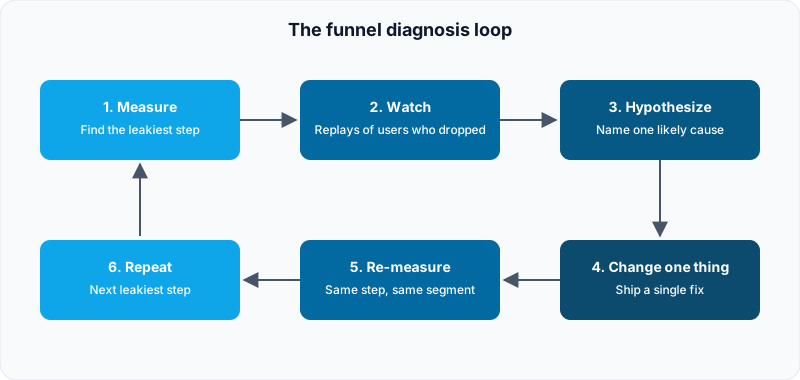
The funnel diagnosis loop: numbers find the leak, recordings explain it, one change tests the fix.
1. Measure: find the leakiest step
Run the funnel for a representative period and segment it. Pick one step, ideally one with real volume and high intent, to investigate.
2. Watch: replays of people who dropped
Find sessions of visitors who reached that step and then left. Watch ten to twenty of them. Don't hunt for a single dramatic recording. Look for the same thing happening repeatedly. For a payment-step drop, you might see patterns like:
- People pause on the payment form and close the tab, which suggests a trust problem.
- People enter a coupon code, get an error, and leave, which suggests a broken discount flow.
- People on phones repeatedly tap a field that doesn't respond, which suggests an input or layout bug.
- People scroll back up to re-read shipping costs and then leave, which suggests a surprise fee revealed too late.
Those are example patterns, not guaranteed findings. Your own recordings will tell you what is actually true on your site. Our session replay guide goes deeper on how to watch recordings efficiently.
Seentics flags rage clicks and JavaScript errors in recordings, which helps you prioritise. A drop-off step that is full of rage clicks is telling you something is not responding the way users expect. See rage clicks explained for what to do with those.
3. Add a heatmap for the page
Seentics provides click maps, scroll-depth maps, and captured page screenshots. On the page where people drop, a heatmap shows whether the main button is even being seen. A classic finding is a primary call to action that sits below the fold on mobile, so many visitors never scroll to it. Our post on heatmaps explained covers how to read these.
4. Hypothesize, change one thing, re-measure
Write the cause as a sentence you can be wrong about: "Mobile users abandon payment because the card field doesn't open the numeric keyboard." Make one change. Re-measure the same step for the same segment over a comparable period. If you change five things at once, you will never know which one worked.

Checkout friction is easier to find when you watch real sessions. Photo: Unsplash.
Common Funnel Tracking Mistakes
Too many or too few steps. Three to seven steps is a good working range. Anything outside tends to either hide the problem or drown it.
Not segmenting. Blended numbers hide failures, as the mobile example showed.
Ignoring traffic quality. A big drop at the very first step can be a traffic problem, not a page problem. If a new campaign sends a lot of low-intent visitors, step 1 to 2 will look worse without your site changing at all.
Tracking the step before the action. A click on "Pay" is not a payment. Prefer the signal that fires after the thing succeeded, such as a confirmation page or a purchase event.
Fixing without watching. Redesigning a page because a number looks bad, without ever watching a recording, is guessing with extra steps.
Forgetting about tracking gaps. Seentics is cookie-free and privacy-first, which means a visitor who changes device mid-funnel is generally not stitched back together unless you identify them. If cross-device journeys matter to you, identify logged-in users with seentics.identify and keep that limitation in mind when reading the numbers.
Funnel Templates
Use these as starting points and adapt the steps to your own site. The "typical suspects" column lists things worth checking in recordings, not predictions.
SaaS signup funnel
| Step | How to track it | Typical suspects when people drop |
|---|---|---|
| Pricing or landing page view | Page | Unclear value, wrong traffic |
| Click on start trial | Selector or event | CTA not visible, weak copy |
| Signup form submitted | Event | Too many fields, validation errors |
| Email verified | Page or event | Email delay, verification link confusion |
| First key action completed | Event | Empty states, unclear next step |
The last step is the one that predicts retention, so treat it as the real finish line. Our SaaS onboarding analytics guide covers the activation side in depth. Seentics behavioral automations (modals, banners, webhooks, and redirects triggered by behaviour) can also be used to nudge people who stall, which is covered in the behavioral automations guide.
Ecommerce checkout funnel
| Step | How to track it | Typical suspects when people drop |
|---|---|---|
| Product page view | Page | Weak photos, no reviews, unclear price |
| Add to cart | Event or selector | Button placement, variant selection friction |
| Cart view / begin checkout | Page | Forced account creation, shipping cost surprise |
| Shipping details | Page | Long forms, address validation |
| Payment | Page | Trust, coupon errors, card field issues on mobile |
| Order confirmed | Page or event with value | Payment failures, errors after submit |
Revenue events with value and currency let you tie funnel steps to money. For more on store analytics see ecommerce analytics.
Lead generation funnel
| Step | How to track it | Typical suspects when people drop |
|---|---|---|
| Landing page view | Page | Message mismatch with the ad or link |
| Scrolled to or viewed the form | Selector or event | Form buried too low |
| Started the form | Event | Intimidating first field |
| Submitted the form | Event | Required fields, validation errors, spam filters |
| Thank-you page | Page | Submit fired but confirmation failed |
A gap between "started the form" and "submitted the form" is a strong sign to watch recordings of that form specifically.
How Seentics Handles Funnels
The Seentics README describes funnels as multi-step conversion analysis with drop-off rates, alongside events and goals that can be page, event, or CSS-selector conversions. Because funnels, session replays, and heatmaps all live in the same product and run off the same tracking script, you can move from "which step is leaking" to "what are people doing there" without exporting data between tools.
Seentics is open source and self-hostable, uses no cookies or fingerprinting, and ships its tracker as a single script:
<script
  defer
  src="https://your-seentics-domain.com/trackers/seentics.js"
  data-website-id="YOUR_WEBSITE_ID"
></script>
Pageviews, scroll depth, exit intent, and rage clicks are captured automatically, so page-based funnel steps work from day one. Add seentics.track(...) calls only for the steps that pages can't express.
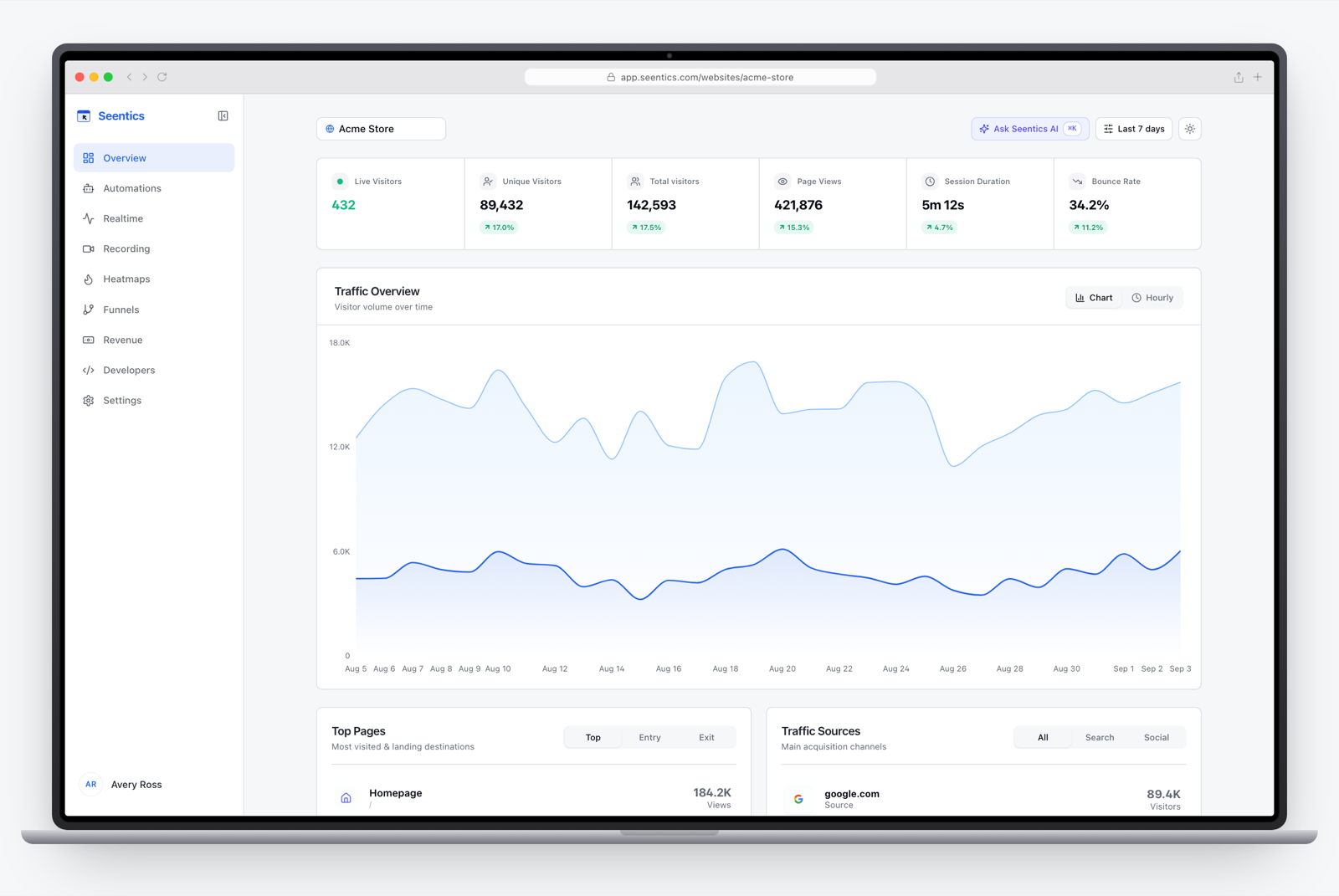
The Seentics dashboard.
Frequently Asked Questions
What is conversion funnel tracking?
It is the practice of defining the ordered steps toward a goal, such as a purchase or signup, and measuring how many visitors reach each step. The output is a set of step conversion and drop-off rates that show where you lose people.
How many steps should a funnel have?
Three to seven is a practical range. Fewer gives you little diagnostic power, and more usually means you should split the flow into two funnels, such as acquisition-to-signup and signup-to-activation.
What is a good funnel conversion rate?
It depends heavily on your industry, traffic quality, price, and what the funnel measures, so a universal number would be misleading. Treat your own history as the baseline and aim to improve it step by step. Compare segments within your own site before you compare yourself to anyone else.
What is the difference between a funnel and a user journey?
A user journey is the full, messy, non-linear path someone takes through your site. A funnel is a deliberately simplified, ordered slice of that journey that ends in a specific goal. Journeys help you discover what to measure, and funnels measure it.
Why is my funnel dropping at the first step?
Often that is traffic quality or message mismatch rather than a page bug. Segment by source or campaign first. If one source converts far worse than the others, the problem may be the targeting, not the page.
How do I find out why people drop off?
Funnels only tell you where. To learn why, watch session recordings of visitors who dropped at that step, check a heatmap of the page, and look for rage clicks or JavaScript errors. Then form one hypothesis, change one thing, and re-measure.
Start With One Funnel
Pick your most valuable conversion. Define three to seven honest steps. Segment by device. Find the leakiest high-intent step, watch real sessions, and change one thing. That is the whole discipline, and it compounds.
If you want to see funnels, session replays, and heatmaps working together, you can try the live demo or explore the open-source project on GitHub.