
Cookie-Free Analytics: GDPR-Compliant Analytics Without a Cookie Banner
Cookie-free analytics explained: how it works, what ePrivacy and GDPR actually require, what you gain and lose, and a checklist for GDPR-compliant analytics.
Most websites handle analytics compliance in one of two ways. Some ignore the rules and run a tracking tool without asking anyone. Others bolt on a consent banner and quietly accept that a chunk of their traffic will never show up in the numbers.
There is a third option: cookie-free analytics, a measurement design where the tool never stores or reads anything on the visitor's device and never builds a profile of a person. Done properly, it can give you GDPR-compliant analytics without a consent pop-up for the analytics itself. Done badly, it is just a marketing label.
This guide explains how cookie-free measurement actually works, what the law says (with sources you can check), what you gain and what you give up, and how to audit your own setup.
Photo by Sasun Bughdaryan on Unsplash.
Not legal advice. This article is general information written by an analytics vendor, not a lawyer. Data protection law differs between EU member states, regulators update their guidance, and your facts matter. Check the primary sources linked below and ask qualified counsel (or your data protection officer) before you remove a banner.
TL;DR
- Two different laws are in play. The ePrivacy Directive (Article 5(3)) governs storing or accessing information on a visitor's device, which is where "cookie banners" come from. The GDPR governs processing of personal data. A tool has to satisfy both.
- Cookie-free analytics aims to pass the first test by not touching the device, and the second by not creating personal data (or by handling it under a lawful basis other than consent).
- "Cookie-free" is not a magic word. IP addresses, persistent identifiers, fingerprinting and cross-site sharing can all bring consent or GDPR duties back.
- Regulators have published concrete conditions. France's CNIL, for example, lists the criteria under which audience measurement can be exempt from consent, and the EDPB has clarified that Article 5(3) reaches beyond cookies.
- Practical upside: when nobody has to click "Accept", every visit can be counted. Practical downside: you give up some person-level questions.
- You will still want a privacy notice. "No banner" does not mean "no transparency".
What "cookie-free analytics" actually means
A traditional analytics tool works like this. On a visitor's first page view, a script writes a small identifier (a cookie, or a value in local storage) onto their browser. On every later visit and every later event, the script reads that identifier and sends it along. The server can then say "this is the same browser as last Tuesday" and stitch events into a long-lived profile.
Cookie-free analytics removes that loop. Concretely, it means:
- Nothing is written to the device for analytics purposes. No analytics cookie, no local storage key, no similar identifier.
- Nothing is read back from the device to recognize the visitor.
- No fingerprinting. The tool does not combine screen size, fonts, canvas rendering and similar signals into a quasi-identifier. This matters because fingerprinting recreates a persistent ID without a cookie, and the EDPB treats it as within the scope of the same rules (more on that below).
- No cross-site tracking. Data collected on your site is not merged with data about the same person on other sites.
The data you do get is what a page view or an event reveals on its own: which page, which referrer, which campaign tags, an approximate location, a device class, and what happened on the page. You can still answer the questions most teams actually have: which pages work, where do visitors come from, where do they drop out of a signup flow.
Different tools implement this differently, and some give up a little accuracy in unique-visitor counts to avoid persistent IDs. For Seentics, the README states the design goal plainly: self-hosted analytics without cookies, fingerprinting, or third-party data sharing, with your data staying on your own infrastructure. If you want the broader philosophy, our privacy-first analytics post covers it, and self-hosted analytics explains why hosting location matters.
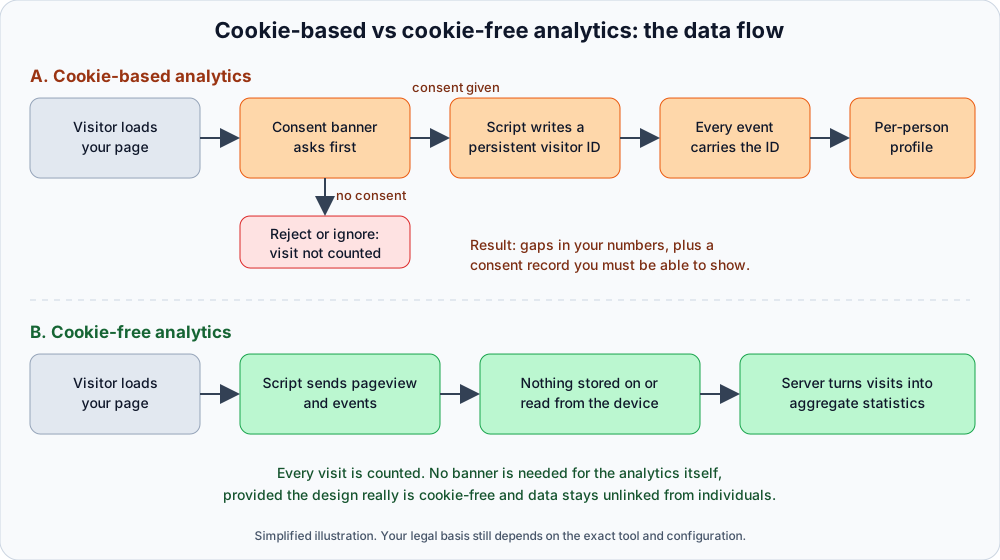
Cookie-based versus cookie-free data flow. A simplified illustration, not a legal analysis.
The legal picture: two laws, two questions
Most confusion about "GDPR and cookies" comes from treating them as one rule. They are two, and they overlap.
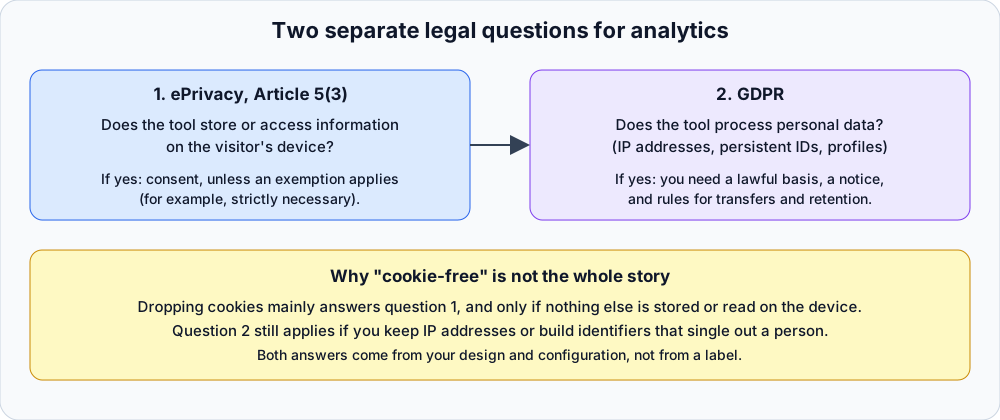
The two questions every analytics setup has to answer.
Question 1: Are you storing or accessing information on the visitor's device?
This is the ePrivacy Directive (2002/58/EC, as amended). Article 5(3) says that storing information, or gaining access to information already stored, in a user's terminal equipment is allowed only if the user has given consent after clear and comprehensive information. The exceptions are narrow: technical storage or access for the sole purpose of carrying out the transmission of a communication, or what is strictly necessary for a service the user explicitly requested. You can read the Directive on EUR-Lex.
A shopping cart cookie or a login session cookie fits the strictly necessary exception. A cookie that lets you measure your own traffic is useful to you, but the European regulators generally do not treat "useful to the publisher" as "strictly necessary for the service the user asked for". That is why analytics cookies normally trigger a banner.
Two points that people often miss:
- The rule is not about the word "cookie". In October 2024 the EDPB adopted the final version of its Guidelines 2/2023 on the technical scope of Article 5(3). According to published summaries of those guidelines, the Board's view is that URL and pixel tracking can fall within Article 5(3), that "gaining access" to stored information is independent from "storing" it, and that IP-address-based tracking is a more nuanced case in which the EDPB advises caution unless you can be sure the address does not originate from the user's terminal equipment. Read the document itself for the precise wording and conditions.
- Article 5(3) is about the device, not about personal data. It applies whether or not the information is personal data. So "we anonymize everything" does not by itself answer question 1 if your script still writes or reads a persistent identifier.
Question 2: Are you processing personal data?
This is the GDPR (Regulation (EU) 2016/679 on EUR-Lex). Personal data is any information relating to an identified or identifiable natural person. Whether a piece of analytics data is "identifiable" depends on what the tool collects and what else can be linked to it. The usual suspects:
- IP addresses. Often treated as personal data, particularly when stored in full.
- Persistent identifiers that single out a browser over time, whether from a cookie, local storage or fingerprinting.
- User IDs you attach through an identify call or similar, such as an account ID or email.
- Rich behavioral timelines tied to any of the above.
If your tool does process personal data, you need a lawful basis under Article 6. Consent is one (and it has strict requirements: freely given, specific, informed, unambiguous). Legitimate interest is another, but it requires a balancing test and works best where the processing is expected and low-impact. You also owe transparency under Articles 13 and 14, a retention policy, and safeguards for any transfer outside the EU or EEA.
If your tool genuinely processes only data that is not personal, because it cannot be linked to an identifiable person by you or anyone else with reasonable means, the GDPR's obligations are lighter for that data. But be honest about the word "genuinely". Regulators look at how the data is actually produced and stored, not at the vendor's description.
How the two combine
| Your setup | ePrivacy Art. 5(3) | GDPR |
|---|---|---|
| Persistent analytics cookie, full IP stored, data sent to a third-party processor | Consent needed | Personal data processed, lawful basis and transfer rules apply |
| No cookie, but fingerprinting to recognize repeat visitors | Likely in scope, consent expected | Likely personal data |
| No cookie, no device access, no persistent ID, aggregate output only | Question 1 is generally answered "no consent trigger" | Little or no personal data, but still document it |
| Cookie used, but it meets a regulator's published exemption conditions (for example CNIL) | Exempt in that jurisdiction, with conditions | Still check GDPR duties and notice |
The table is a map of the reasoning, not a verdict. National implementations of ePrivacy differ, and your own facts decide where you land.
What the CNIL says about consent-free audience measurement
France's regulator has gone furthest in writing down the conditions. On its audience measurement guidance the CNIL says certain trackers can be exempt from consent if, among other things:
- they are strictly limited to audience measurement of your own site or application (performance, navigation problems, capacity, content analysis), exclusively for the publisher's benefit;
- they produce anonymous statistical data only;
- they do not allow cross-referencing with other processing or transmission of non-anonymous data to third parties;
- they do not track users across multiple sites or apps using the same identifier;
- where cookies are used, the lifespan is limited (the CNIL recommends 13 months maximum, not automatically extended on new visits) and data is kept for a limited period (25 months maximum), with both durations periodically reassessed;
- users are informed (typically via the privacy policy).
Notice what this teaches. Even the most permissive regulator exemption comes with an information duty and tight purpose limits, and it covers a defined measurement use, not "any analytics at all". It also shows why a design that never touches the device is easier to reason about than one that relies on an exemption: there is simply less to qualify.
Other authorities have their own positions, and some are stricter. If you operate mainly in one country, read that regulator's own guidance.
What about the Google Analytics rulings?
Our post on why teams leave Google Analytics covers the migration side. The legal side deserves a careful sentence or two, because it is often oversimplified.
Several European data protection authorities, acting on complaints in 2022, concluded that specific Google Analytics configurations led to unlawful transfers of personal data to the United States. The reasoning centred on transfers under Chapter V of the GDPR and on the identifiers used, rather than on the idea that analytics is illegal.
The transfer picture has changed since. The European Commission adopted the EU-US Data Privacy Framework adequacy decision in 2023, and on 3 September 2025 the EU General Court dismissed a challenge to it (Case T-553/23, Latombe v Commission), confirming that transfers to certified US organizations can continue on that basis. That addresses the transfer concern for certified providers. It does not remove the Article 5(3) question: if a tool still sets persistent identifiers on the device, consent is still the usual route. And the decision has been challenged before, so it is worth watching rather than assuming.
The takeaway is not "never use Google Analytics". It is that "which tool" matters less than "what the tool stores on the device, what personal data it processes, where it flows, and what you told the visitor".
What you gain with cookie-free analytics
More complete numbers
When analytics depends on a banner, your data only covers visitors who accept. The share who accept varies by country, banner design and audience, and you generally cannot know how it skews your sample, because the people who decline are not a random subset. If your measurement does not require consent, there is no consent gap: a visit is a visit. You can measure real traffic and conversion rates against a complete baseline instead of a self-selected one.
Less compliance surface
Fewer moving parts means fewer things to get wrong. No banner vendor, no consent log to defend, no risk that a tag fires before consent because of a misconfigured tag manager. A common finding in privacy audits is that "rejecting" cookies does not actually stop the analytics script; a cookie-free design removes that entire failure class.
Easier data minimization
If the tool never receives an identifier, you cannot leak one. Data minimization (Article 5(1)(c) GDPR) stops being a policy and becomes a property of the system.
What you lose, honestly
Cookie-free is a trade, and it helps to name the costs.
- Weaker returning-visitor recognition. Without a persistent ID, "unique visitors" over long periods become approximate. A person who visits on Monday and again on Friday may be counted as two visitors in some designs. Expect less precise multi-week cohort and retention analysis.
- No long-term cross-session paths for anonymous people. You can still see what happens inside a visit, and you can analyze funnels within a session. A journey that spans weeks and devices is something you can only reconstruct for people who identify themselves (by logging in, for instance), and at that point you have personal data again and the GDPR duties that go with it.
- Limited cross-device attribution. Marketing attribution that depends on stitching a user across devices and channels over a long window is harder, by design.
- Some features are inherently more sensitive. Session replay captures what a visitor does on a page, which is a richer data type than a page view. See the next section.
If your business genuinely needs person-level analytics, for example product analytics on logged-in users, treat that as a separate processing activity with its own lawful basis and notice, rather than trying to blur it into a "cookie-free" claim.
Session replays, heatmaps and the "no banner" claim
Aggregate counts are the easy case. Session replays and heatmaps ask harder questions, because they record or reflect individual interaction with your pages.
Seentics offers session replays (built on rrweb, with rage-click and JavaScript error detection) and heatmaps (click maps, scroll depth and page screenshots), alongside funnels, goals and revenue attribution. Those are useful features, and you should not assume the "no banner" conclusion for analytics counts automatically transfers to a recording of a visitor's session. Whether a given replay setup needs consent, a legitimate-interest assessment, or neither depends on what it captures, how long you keep it, who can see it, and your national regulator's view.
Sensible habits regardless of tool:
- Keep recordings on infrastructure you control (self-hosting helps here; see our session replay guide).
- Review what your replays can capture on forms and sensitive pages, and exclude pages (account, payments, health or similar) where recording makes no sense.
- Set a retention period and stick to it.
- Say in your privacy notice that session replays are used and why.
- If you tie recordings to a known user through an identify call, treat that as processing of personal data.
A compliance checklist for cookie-free, GDPR-compliant analytics
Use this to audit your current setup or vet a new tool. Every item in the first two blocks should be checked before you remove a banner.

Photo by Sasun Bughdaryan on Unsplash.
Device access (ePrivacy)
- The analytics script does not set cookies, local storage entries or similar identifiers. (Check in your browser's developer tools, Application tab, before and after load.)
- It does not read identifiers set by anything else for analytics purposes.
- The vendor states, in writing, that it does not use fingerprinting.
- Other scripts on the page (tag managers, chat widgets, ad pixels) are audited separately. One stray marketing tag can undo everything.
Personal data (GDPR)
- You know what the tool does with IP addresses (stored, truncated, used once and discarded) and you can explain it.
- No persistent identifier links visits across days or weeks.
- You do not attach emails, names or account IDs to analytics events, or, if you do, you treat that data as personal data with a lawful basis.
- Data is not shared with third parties for their own purposes (advertising, profiling, product improvement).
- Hosting location and any international transfers are documented. Self-hosting simplifies this.
- A retention period is set and enforced.
Transparency and records
- Your privacy notice describes the analytics you run, what is collected, why, how long it is kept, and how to object.
- You have written down your reasoning (a short assessment of why you concluded no consent is needed). If a regulator asks, this is your first exhibit.
- If you operate in a country whose regulator has published specific conditions (such as France's CNIL), you have checked them.
- You have confirmed any other cookie or tracker on the site still has its own lawful basis; removing the analytics banner does not remove the need for consent for advertising cookies, for example.
Verification
- You tested in a clean browser profile, with and without blockers, and watched the network tab.
- You re-test after major site changes, new tags or tool upgrades.
How to move to cookie-free analytics
- List what you actually need to know. Most teams need traffic sources, top content, conversion funnels and an idea of where visitors get stuck. Very few need an individual's six-month browsing history.
- Pick a tool whose architecture matches the claim. Read the documentation and the source if it is open. For Seentics, the repository is public at github.com/Seentics/seentics, and you can read exactly what the tracker does. The snippet is a single deferred script tag with your website ID.
- Run it next to the old tool briefly, compare the numbers, then retire the old one. Do not leave a consent-requiring tool running quietly in parallel.
- Update your privacy notice to describe the new setup.
- Re-test the banner. If analytics was the only reason for it, you can remove it. If you still run advertising or other non-essential trackers, keep a banner for those, and make sure analytics is not loading behind it.
Our what is web analytics primer and funnel analysis guide help once data is flowing.
Frequently asked questions
Is cookie-free analytics automatically GDPR compliant?
No. Cookie-free addresses the device-access question under ePrivacy. GDPR compliance also depends on whether you process personal data, your lawful basis, transparency, retention and transfers. A cookie-free tool that stores full IP addresses and ships them to a third party can still raise GDPR issues.
Do I still need a privacy policy if I do not use cookies?
Yes. The CNIL's consent-exemption conditions, for instance, include informing users, and the GDPR's transparency duties apply whenever personal data is processed. Describe your analytics in your privacy notice in plain language.
Can I really remove my cookie banner?
Possibly, if the banner exists only for analytics and your analytics truly does not store or access anything on the device and does not need consent as personal data processing. Any other non-essential cookie or tracker on your site (advertising, embedded third-party content, social pixels) still needs its own treatment. Verify with a network and storage audit, then get legal sign-off.
Is IP address handling a problem for cookie-free tools?
It can be. IP addresses are often personal data, and the EDPB has said IP-based tracking can be in scope of Article 5(3) in some situations. What matters is what the tool does with the address (for example resolving an approximate location and not retaining the address) and whether it is used to recognize or follow a person. Ask the vendor, or read the code if the tool is open source.
What about session replays and heatmaps without consent?
Treat them as a separate question from aggregate page-view counts. They capture richer behavioral data, so review what is recorded, minimize it, set retention, disclose it in your privacy notice, and check your regulator's guidance. If you are unsure, a short legitimate-interest assessment or a consent prompt scoped to replay only is a defensible, cautious path.
The bottom line
The consent banner exists because some analytics tools store identifiers on your visitors' devices and build profiles from them. If you choose a tool that does neither, by design and not just by label, you can often drop the banner for analytics, count every visit, and spend less time on compliance paperwork. The condition is that you check the claim: inspect the storage, understand the IP handling, write down your reasoning, tell visitors what you measure, and get advice for your jurisdiction.
If you want to see what cookie-free analytics looks like in practice, the live demo needs no account, and the project is open source on GitHub.
Information as of October 2026. Not legal advice.