
10 Best Google Analytics Alternatives (2026)
The best Google Analytics alternatives in 2026, compared honestly: Plausible, Fathom, Matomo, PostHog, Umami and more, with a table and a decision flowchart.
You do not have to leave Google Analytics because it is bad. Plenty of teams leave because it is more than they need, because the consent banner costs them data, because EU regulators keep questioning it, or because they simply never open it. Whatever your reason, the market for Google Analytics alternatives is now crowded enough that picking one is a real project.
This guide compares ten of them honestly: what each does well, where each falls short, and who should choose it. We build one of them (Seentics), so we flag that clearly and try to be fair to the rest. All pricing and feature details below were checked against each vendor's own pages in October 2026, but they change often, so confirm before you buy.
Photo: Unsplash (photo-1551288049-bebda4e38f71).
TL;DR
- Want the simplest privacy-friendly traffic stats, hosted for you: Plausible, Fathom, Simple Analytics or Pirsch.
- Want to self-host a light tool: Umami (MIT) or Plausible Community Edition (AGPL).
- Want a full GA replacement you can self-host, with more features: Matomo.
- Want product analytics for a SaaS app: PostHog or Mixpanel.
- Want web analytics plus session replay, heatmaps and funnels in one open-source tool: Seentics.
- Want free replays and heatmaps next to whatever you pick: Microsoft Clarity.
How to choose (before you read the list)
Most comparison posts rank tools as if one winner exists. It does not. These products solve three different problems, and picking the wrong category is the most common mistake.
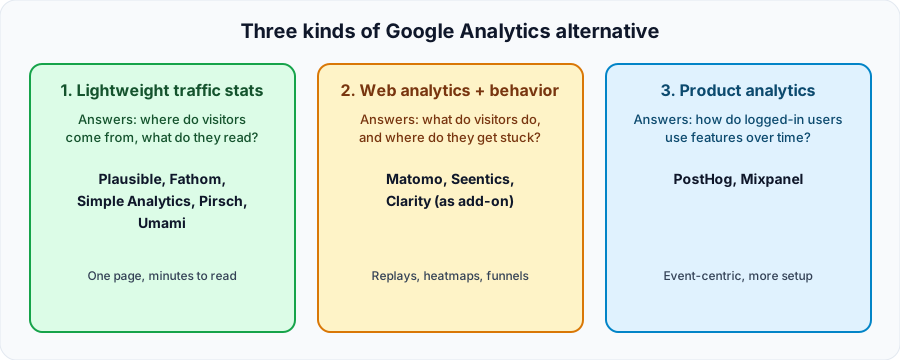
Three categories of alternative. Most teams need one category, sometimes two.
- Lightweight traffic stats. One dashboard: pageviews, referrers, countries, a few goals. Fast to read, nothing to configure.
- Web analytics plus behavior. The same basics, plus tools to see what visitors do on the page: session replay, heatmaps, funnels.
- Product analytics. Event-centric analysis of logged-in users: retention, cohorts, feature adoption.
Ask what decision the data needs to support. If the answer is "which blog post brought traffic," category 1 is plenty. If it is "why does checkout lose people," you need category 2. If it is "do users who adopt feature X stay longer," you need category 3.
Comparison table (as of October 2026)
| Tool | Category | Open source | Self-host | Starting price (as stated by vendor) | Cookies |
|---|---|---|---|---|---|
| Plausible | Lightweight | Yes (AGPLv3) | Yes (Community Edition) | $9/month, 30-day trial | None |
| Fathom | Lightweight | Not verified | Not verified | $15/month, 7-day trial | No cookie banners required |
| Matomo | Full web analytics | Yes | Yes (free Community Edition) | Cloud from 29 EUR/month | See vendor docs |
| Simple Analytics | Lightweight | Not stated on pricing page | No | $20/month, plus a limited free plan | None |
| PostHog | Product analytics | Yes (MIT, except ee directory) | Yes (hobby deploy) | Free monthly allowance, then usage-based | Configurable |
| Umami | Lightweight | Yes (MIT) | Yes | Free to self-host; cloud has a free tier | None |
| Pirsch | Lightweight | Not stated | Enterprise plan | $6/month, 30-day trial | None |
| Mixpanel | Product analytics | No | No | Free plan up to 1M events/month | Configurable |
| Microsoft Clarity | Behavior add-on | No | No | Free | See vendor docs |
| Seentics | Web analytics + behavior | Yes (AGPLv3) | Yes | See seentics.com | None |
"Not verified" means we could not confirm it on the vendor's official pages, not that the answer is no.
The 10 best Google Analytics alternatives
1. Plausible
Plausible is the reference point for the lightweight category. It describes itself as privacy-friendly analytics that does not use cookies, has a single-page dashboard, a script it says is 54 times smaller than Google Analytics, codeless goals and revenue tracking, and funnels. Hosting is in the EU.
- Pricing: starts at $9/month for up to 10k monthly pageviews, with a 30-day free trial and no card required.
- Open source: the Community Edition is AGPLv3; the tracker script is MIT.
- Trade-off: per Plausible's own documentation, the self-hosted edition lacks some premium features (marketing funnels, ecommerce goals, SSO) and gets releases twice a year, while the cloud ships continuously. It also has no session replay or heatmaps.
Best for: teams that want a clean, trustworthy traffic dashboard and are happy to pay a small monthly fee.
2. Fathom Analytics
Fathom targets the same simplicity-first audience, with a strong agency angle: every plan includes at least 50 sites, plus event and revenue tracking, UTM campaign tracking, an API and unlimited email reports. EU data isolation is available.
- Pricing: from $15/month for 100,000 monthly pageviews, scaling by traffic. There is no free tier and the 7-day trial asks for a card.
- Trade-off: it costs more than some peers at the entry level, and like Plausible it stays at the traffic-stats level rather than showing behavior.
Best for: agencies and freelancers who manage many small sites and want one invoice and one clean interface.
3. Matomo
Matomo is the closest thing to a feature-for-feature Google Analytics replacement. All plans include ecommerce and event tracking, real-time data, segmentation and customizable dashboards. The Community Edition is free on your own servers with unlimited users and hits, and the paid tiers add funnels, heatmaps, session recording, form analytics and more.
- Pricing: Cloud starts at 29 EUR/month. Per Matomo's pricing page, funnels, heatmaps and session recording appear in paid self-hosted bundles starting at 275 EUR/month (Team), so check which features your plan includes.
- Trade-off: it is the most complex tool here to run and learn, and the behavior features sit behind paid plans.
Best for: organizations that need depth, data ownership and an interface that feels familiar to ex-Google-Analytics users.
4. Simple Analytics
Simple Analytics is built around a one-page dashboard with no configuration, no cookies and no personal data, hosted in the EU. Its enterprise offering includes a 30-day proof of concept run alongside GA4, aimed at measuring traffic that consent rejections cause GA4 to miss.
- Pricing: from $20/month for the self-serve plan; a limited free plan covers 1 user, 5 websites and 1 month of history.
- Trade-off: the pricing page does not mention open source or self-hosting, so treat it as a managed service.
Best for: small teams that want the least possible setup and a free way to try it.
5. PostHog
PostHog is a different animal: an open-source product platform covering product analytics, session replay, feature flags, experiments, surveys and error tracking. The repository is MIT-licensed except for an ee directory with its own license.
- Pricing: the project states that your first 1 million events and 5k recordings per month are free; usage-based after that.
- Self-hosting: the hobby deployment is intended for roughly 100k events per month, and the project recommends moving to Cloud beyond that.
- Trade-off: it is broad, which means more to learn and configure than a pageview tool. Marketing sites that only need traffic stats will find it heavy.
Best for: product and engineering teams running a SaaS app who want analytics, flags and experiments in one platform.
6. Umami
Umami is a small, MIT-licensed, privacy-focused tool built on Next.js and PostgreSQL. It is "no cookies, no surveillance" by design, and it has both a self-hosted route and a cloud service with a free tier.
- Trade-off: its scope is deliberately modest. You get clean traffic and event stats, not replays or heatmaps. As with any self-hosted tool, you own the upgrades and backups.
Best for: developers who want a tiny, hackable, self-hosted replacement and nothing more.
7. Pirsch
Pirsch is a cookie-free analytics service hosted in Germany. It lists event tracking, conversion goals, session analysis, a Google Analytics import, an API and webhooks, with unlimited retention and team members.
- Pricing: from $6/month for 10,000 page views, with a 30-day free trial.
- Self-hosting: an on-premise option is part of the Enterprise plan.
- Trade-off: we could not confirm its licensing model from the pricing page, so check the project if open source matters to you.
Best for: budget-conscious teams in Europe that want a low entry price and a GA import path.
8. Mixpanel
Mixpanel is a product-analytics specialist rather than a drop-in GA replacement. Its free plan includes up to 1M events per month, 10K session replays, unlimited seats, and funnels and retention analysis.
- Trade-off: it is not open source or self-hostable, and it expects you to plan your events up front. It is a poor fit if you just want to see which pages get visits.
Best for: product teams who already know the user actions they want to measure and care about retention.
9. Microsoft Clarity (as a complement)
Microsoft Clarity is not a GA replacement; it is the best free add-on. It is described as free forever with no limits on traffic, and it offers heatmaps, session recordings and AI summaries.
- Trade-off: it is a hosted Microsoft service, so it does not solve data-ownership or self-hosting needs, and it is not a traffic-reporting dashboard in the GA sense. Review its data-handling terms against your own compliance requirements.
Best for: anyone who wants to try replays and heatmaps at zero cost alongside another analytics tool.
10. Seentics (our tool)
Seentics is an open-source, self-hostable, privacy-first analytics platform that uses no cookies and no fingerprinting. The idea is to put what usually takes three tools into one: real-time analytics, plus session replays, heatmaps and funnels.
What the project's README lists:
- Real-time analytics with revenue and UTM attribution.
- Session replays (recorded with rrweb) with rage-click and JavaScript error detection.
- Heatmaps: click, scroll depth and screenshots.
- Funnels with drop-off rates.
- Events and goals, including CSS-selector conversions.
- Behavioral automations and natural-language AI queries.
- License: GNU AGPL v3.0, so you can self-host freely.
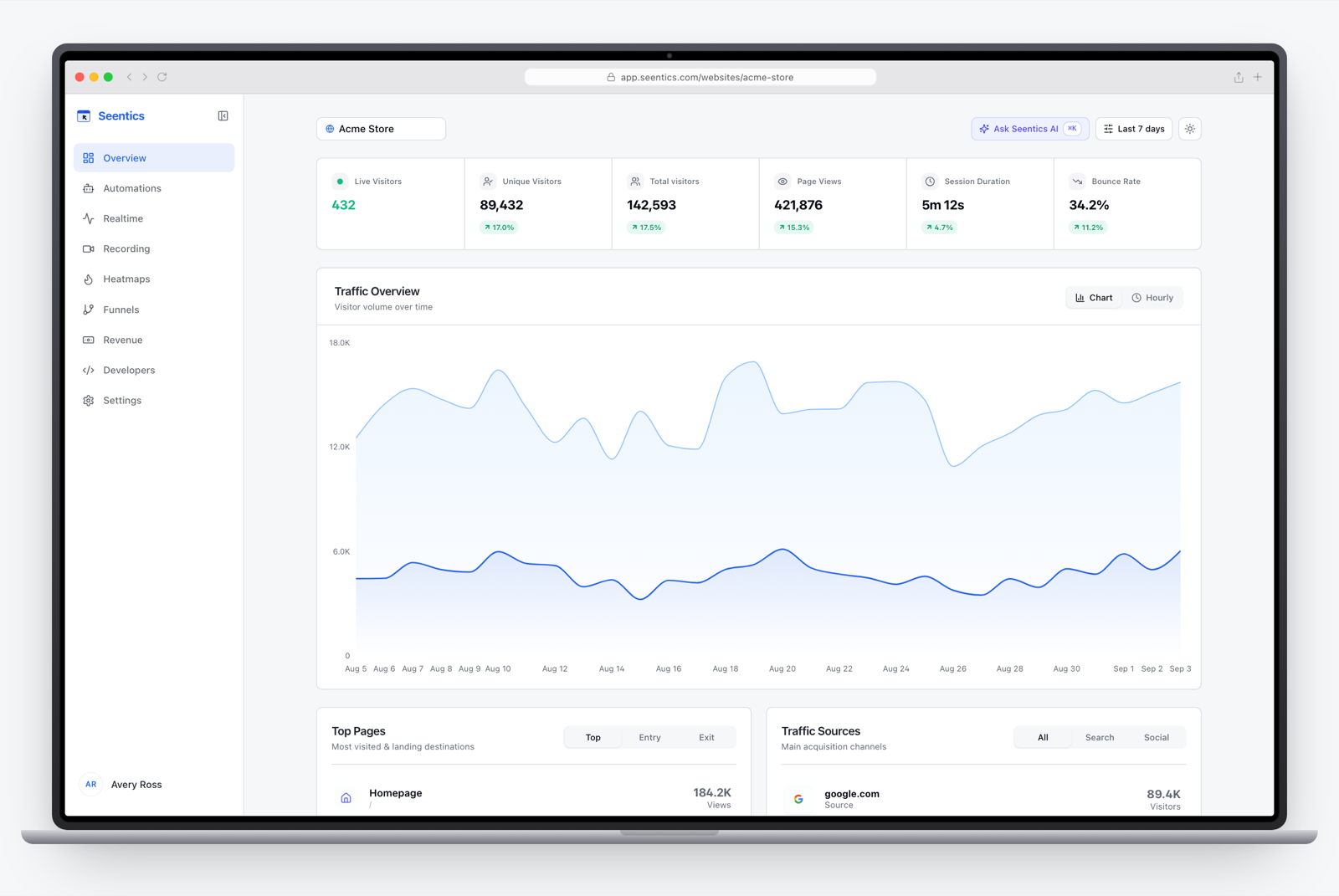
The Seentics dashboard.
- Trade-off: it is a newer project than Plausible, Matomo or PostHog, so it has a smaller community and ecosystem. If all you want is a one-screen traffic summary, a lighter tool may be all you need.
Best for: teams that want to understand not only how many people visited but why they left, and who prefer open source and the option to self-host.
Best for... at a glance
| If you are... | Consider |
|---|---|
| A blogger or small site owner wanting simple stats | Plausible, Simple Analytics, Umami |
| An agency managing many client sites | Fathom, Plausible |
| An EU company worried about data location | Plausible, Simple Analytics, Pirsch, Matomo Cloud (Frankfurt) |
| A developer who wants to self-host something small | Umami, Plausible CE |
| An org that wants the broadest GA-style feature set | Matomo |
| A SaaS team analyzing feature usage and retention | PostHog, Mixpanel |
| A team optimizing conversion on a marketing site or store | Seentics, Matomo, Clarity alongside another tool |
| On a zero budget and just want replays | Microsoft Clarity |
Decision flowchart
If the table still leaves you torn, follow the flowchart. It asks two things: what you need to learn, and whether you want to run the software yourself.
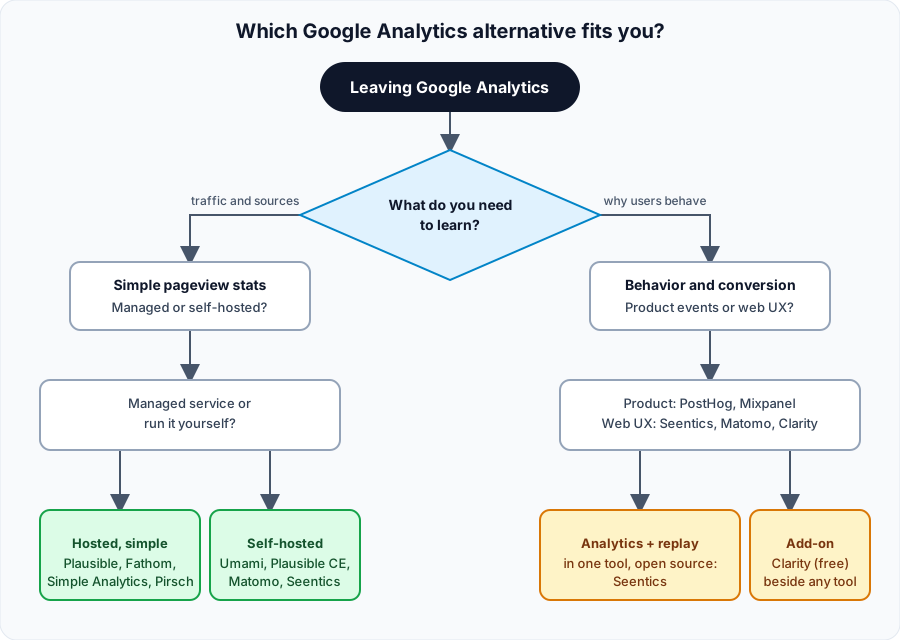
Pick by the question you need answered, then by hosting preference.
What none of these will do (and what to check before switching)
Moving off Google Analytics has real costs, and no list should hide them.
- Search Console and Google Ads integration. GA connects natively to Google's marketing products. Alternatives do some of this (Plausible mentions Google Search Console integration), but check the specific integration you rely on.
- Audiences and ad remarketing. Privacy-first tools deliberately do not build cross-site profiles. If remarketing is core to your business, you will miss that.
- Historical data. Most teams start fresh. Pirsch lists a Google Analytics import, so ask whether your candidate offers one.
- Visitor counts will differ. A cookieless tool will count visitors differently than GA, and tools that skip consent banners may count people GA never saw. Run both side by side for a month before cutting over.
- Compliance is not automatic. Not using cookies helps, but legal advice depends on your jurisdiction and setup. We cover the reasoning in GDPR analytics without a cookie banner.

Photo: Unsplash (photo-1460925895917-afdab827c52f).
A sensible migration plan
- Write down your five most-used GA reports. If the replacement cannot reproduce them, it is the wrong tool.
- Install the new tool alongside GA for two to four weeks.
- Compare the numbers on a few pages and expect differences; look for consistent trends rather than identical totals.
- Re-create your key goals (signups, purchases, form submits) in the new tool.
- Remove the GA tag and any consent-banner logic it forced on you.
- Add behavior tools if needed. If the question is "why," add replays and heatmaps. See our guides to session replay and heatmaps.
For the broader case for switching, read why teams are leaving Google Analytics. If you want to run it yourself, see our self-hosted analytics guide.
FAQ
What is the best free Google Analytics alternative?
It depends on what "free" means to you. Umami and Matomo's Community Edition are free to self-host (you pay for the server and your time). Microsoft Clarity is free with no traffic limits but covers behavior rather than traffic reporting. PostHog and Mixpanel have free monthly allowances, and Simple Analytics offers a limited free plan. Seentics is open source under AGPL v3.0 and can be self-hosted.
What is the best Google Analytics alternative for privacy?
Plausible, Fathom, Simple Analytics, Pirsch, Umami and Seentics all describe themselves as cookieless or not requiring cookie banners. If data location matters, check where each is hosted: Plausible, Simple Analytics and Matomo Cloud describe EU hosting, and Pirsch describes hosting in Germany. Self-hosting gives you the most control of all.
Can I replace Google Analytics and still see session replays and heatmaps?
Yes. Matomo (paid tiers), PostHog (session replay), Mixpanel (session replays), Microsoft Clarity and Seentics all offer some form of replay or heatmaps. Plausible, Fathom, Simple Analytics and Umami focus on traffic stats and do not.
Will I lose my historical Google Analytics data?
Your existing data stays in Google Analytics for as long as Google retains it, so export what you need first. Most alternatives start from the day you install them, though some, such as Pirsch, list a Google Analytics import. Running both tools in parallel for a few weeks makes the changeover safer.
Do I need a cookie banner with these tools?
Several vendors state that their products do not require one, because they do not use cookies or process personal data in the way that triggers consent. Whether that holds for your site depends on your jurisdiction, your configuration and any other scripts you load, so get legal advice if you are unsure.
Is self-hosting worth the effort?
If you value data ownership, have an engineer who is comfortable with Docker and databases, and want to avoid per-pageview pricing, yes. If you would rather not think about upgrades and backups, a managed service from any tool above is the better call. Note that self-hosted editions may lack some cloud features, as Plausible documents for its Community Edition.
Try one, then decide
The cheapest way to choose is to run two candidates for a month. If behavior data sounds like what you are missing, you can explore the live Seentics demo without signing up, or read the code and self-host it from GitHub.