Best Heatmap Tools for Websites (Free and Paid, 2026)
The best heatmap tools for websites in 2026, compared: Hotjar, Clarity, Crazy Egg, Mouseflow, Lucky Orange, VWO, PostHog, Seentics and more. Free and paid.
You have a page that gets traffic and doesn't convert. Analytics tells you that people leave. It doesn't tell you what they looked at, what they tried to click, or where they gave up. That is the gap heatmap tools for websites fill: they overlay aggregated behavior on your actual page, so you can see the problem instead of inferring it from a bounce rate.
The category has also shifted in the last year. One of the best-known names has stopped taking new signups, another is being wound down, and a free option from Microsoft has made "heatmaps cost money" mostly untrue. This guide walks through nine tools, what the three main heatmap types actually tell you, how to read them, and the mistakes that make teams draw the wrong conclusion.
Photo by Luke Chesser on Unsplash.
TL;DR
- Cheapest way to start: Microsoft Clarity. Its site describes it as free forever with no traffic limits, and heatmaps are included.
- Hotjar: its own site now says new accounts can't be created; new users are pointed to Contentsquare's free plan.
- Smartlook: end of sale for new subscriptions was May 31, 2026, and the product is being folded into Splunk Observability Cloud. Don't start a new project on it.
- Paid, heatmap-first: Crazy Egg, Mouseflow and Lucky Orange all publish self-serve plans starting around $25 to $32 a month.
- Part of an experimentation suite: VWO.
- Heatmaps inside a product analytics platform: PostHog.
- Open source, self-hostable, privacy-first: Seentics, which bundles click and scroll-depth heatmaps with session replay and funnels.
Pricing and availability below are as of October 2026 and were taken from each vendor's own pages. They change often, so confirm before you buy.
What heatmap tools for websites actually do
A heatmap tool loads a small script on your site, records interactions (clicks, taps, scroll position, sometimes pointer movement), then renders those interactions on top of a snapshot of your page. Warm colors mean more activity, cool colors mean less.
If you want the full background first, our heatmaps explained post covers what they are and when to use them. Here we focus on choosing a tool, and on reading the output correctly.
The three heatmap types, and how to read each
Click maps
A click map plots every click or tap. It answers: what do people try to interact with?
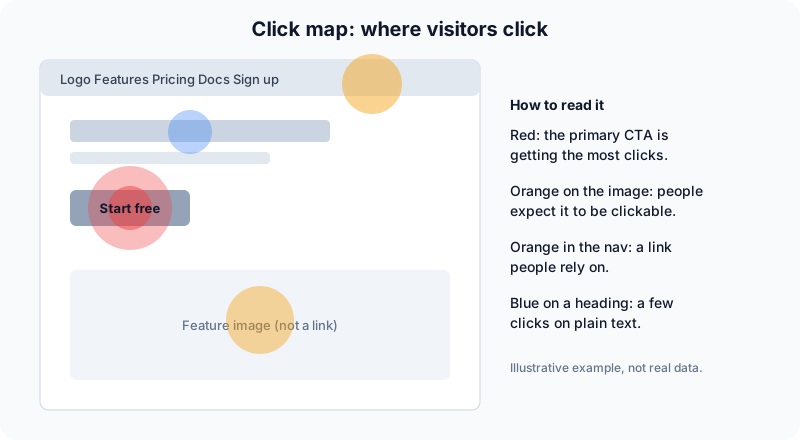
A click map on an illustrative page. Not real data.
How to read it:
- Start with your primary call to action. Is it the hottest element? If a secondary link outperforms it, your hierarchy is wrong.
- Look for hot spots on things that aren't links. Clicks on an image, a heading or a price mean visitors expect it to do something.
- Check the navigation. A heavily clicked nav item you consider minor may deserve better placement; a dead nav item may deserve removal.
- Watch for clusters of rapid repeat clicks. That is usually frustration. See rage clicks explained for what to do about it.
Scroll maps
A scroll map shows the share of visitors who reach each vertical position. It answers: how much of this page is anyone reading?
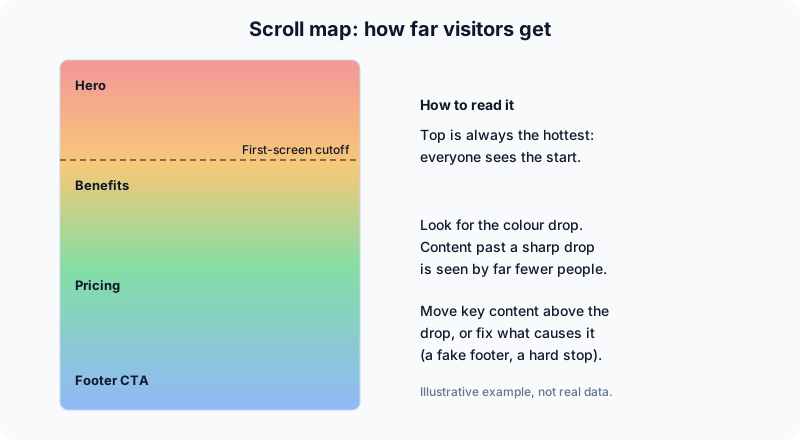
A scroll map on an illustrative page. Not real data.
How to read it:
- The top is always hottest. Everyone starts there, so don't be impressed by it.
- Look for sharp color changes, not gradual fading. A gradual cool-down is normal. A sudden drop at one point means something made people stop: a full-width banner that looks like the end of the page, a big whitespace gap, or a visual break that signals "footer."
- Place your important content above the drop. If pricing sits below the point where most visitors leave, they never see it.
- Compare the average fold to your layout. Different devices fold in different places, which is why the device split below matters.
Move maps
A move map (sometimes called a hover map) records where the pointer travels and rests. It answers: where might attention be going?
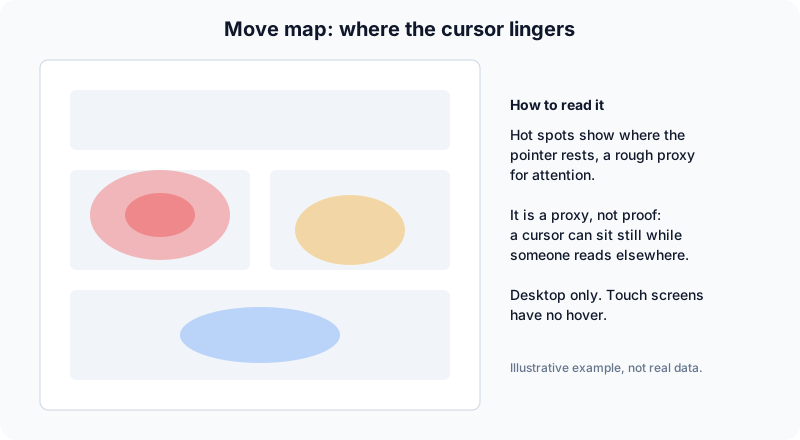
A move map on an illustrative page. Not real data.
Move maps are the most over-trusted of the three. The idea is that people loosely follow their gaze with the cursor, but that relationship is weak and varies a lot by person. Treat a move map as a hint to investigate, never as proof that someone read a block of text. It also has nothing to say about phones and tablets, where there is no hover.
If you only have time for one map, start with scroll and click. They record things the visitor actually did.
Common mistakes when reading heatmaps
Reading them on too little data
A heatmap built from a few dozen sessions can look decisive and be pure noise. A few enthusiastic visitors turn into a bright red patch. There is no universal threshold, but the principle is simple: if one unusual visitor could visibly change the picture, you don't have enough data yet. Let the page collect traffic before you redesign anything, and treat low-traffic pages as a reason to watch individual session replays instead.
Mixing desktop, tablet and mobile
A page reflows at different widths. A button that sits at the top of the mobile layout can be mid-page on desktop, so one blended map overlays two different pages. Always split by device before you read anything. Mobile scroll depth in particular tends to look nothing like desktop.
Ignoring dynamic and personalized pages
Heatmaps assume a stable layout. Tabs, accordions, carousels, cookie banners, logged-in states, A/B tests and personalized content all change what sits where. Clicks can land on a snapshot that never matched what the visitor saw. Check how your tool handles these before trusting the map, and where it can't cope, segment by variant or capture the specific state.
Treating a hot spot as a verdict
A heatmap shows behavior, not intent. A hot button might be hot because it's persuasive, or because it's confusing and people keep trying. Pair every heatmap with another signal: replays for the "why," funnels for the "how many." Our conversion rate optimization guide lays out how to combine them.
Changing five things at once
If you move the CTA, rewrite the headline and remove a section in one release, you can't tell which change moved the heatmap. Change one thing, wait for enough traffic, compare.
What to look for in a heatmap tool
- Heatmap types. Click and scroll are table stakes. Move maps and rage-click views are extras.
- Device segmentation. You need desktop, tablet and mobile views separately.
- Handling of dynamic content. Does it capture a faithful snapshot of your page, including states behind interaction?
- Session replay alongside. The map tells you where; the recording tells you why.
- Sampling and traffic limits. Plans are usually priced by monthly sessions or pageviews.
- Privacy and hosting. Where does the data live, what does the script set, and how do input fields get masked?
- Cost at your traffic level. Free tiers are generous in some tools and tight in others.
The best heatmap tools for websites in 2026
1. Microsoft Clarity: best free option
Clarity is Microsoft's behavior analytics product. Its homepage describes it as free forever with no limits on traffic, and lists heatmaps and session recordings among what's included, alongside AI summaries.
Good for: teams that want heatmaps and recordings at zero cost and don't mind a hosted, third-party service.
Keep in mind: it is a hosted product, so your behavioral data is processed by a third party. If that matters for your compliance posture, read its documentation on data handling before deploying.
2. Hotjar (now Contentsquare): the familiar name, in transition
Hotjar built the category for small teams. As of October 2026, however, its own page states that it's no longer possible to create a new Hotjar account, and that new users can sign up for free on Contentsquare instead. That page describes a free plan with heatmaps, session replay, surveys and funnels, plus a 15-day trial of a paid plan, with no price listed.
Good for: existing Hotjar customers, and teams already evaluating Contentsquare.
Keep in mind: if you were planning to "just use Hotjar," check what your actual sign-up path is today. Pricing wasn't published on the page we checked.
3. Crazy Egg: heatmap-first with trials
Crazy Egg has been a heatmap-focused product for a long time. Its pricing page lists four annually billed plans: Starter at $29 a month (5,000 tracked pageviews and 50 recordings a month), Plus at $99, Pro at $249 and Enterprise at $599. All plans include heatmap reports, A/B testing, error tracking and surveys, with free trials available.
Good for: marketers and small teams who want a straightforward heatmap and testing product on a predictable plan.
Keep in mind: the entry plan's pageview cap is low for any site with real traffic.
4. Mouseflow: a real free tier
Mouseflow offers a Free plan with 500 monthly sessions, 1 website and 1 funnel, then Essential at $25 a month, Advanced at $109, Premium at $319 and custom Enterprise. Paid plans include session replay, heatmaps (click, scroll and geo-based), friction detection and funnels, and there is a 14-day trial with no credit card.
Good for: testing a heatmap workflow on one small site before paying.
Keep in mind: 500 sessions a month is a very small sample; that's for learning the tool, not for design decisions.
5. Lucky Orange: heatmaps and recordings on every plan
Lucky Orange lists Build at $32 a month, Grow at $72, Expand at $199 and Scale at $839 (all billed annually), plus Enterprise. Heatmaps and session recordings are included across tiers, with a 7-day free trial. The entry plan covers 3,500 sessions a month.
Good for: small-to-mid sites that want everything bundled and tiered by session volume.
Keep in mind: costs scale quickly as traffic does.
6. VWO Insights: for teams that already test
VWO (from Wingify) offers heatmaps, scrollmaps, session recordings and form analytics, and positions them as part of one workflow with its experimentation and personalization tools. The page mentions a 30-day free trial with no credit card. We couldn't find specific plan prices on the pages we checked.
Good for: teams running A/B tests who want the discovery step and the testing step in one place.
Keep in mind: if you only want heatmaps, a suite is more than you need.
7. Smartlook: avoid for new projects
Smartlook's own site says it has been acquired by Cisco and is moving into Splunk Observability Cloud. End of sale for new subscriptions was May 31, 2026; the last day of support for paid plans is August 31, 2027; and the platform is to be decommissioned on September 30, 2027, with data deleted and no historical migration. Heatmaps and replay are expected to continue within the new suite.
Good for: existing customers riding out a subscription.
Keep in mind: if you use it, export your data before the cutoff.
8. PostHog: heatmaps inside product analytics
PostHog records clicks, rageclicks, dead clicks and mouse movement, plus scroll depth. Its docs say heatmap data is free to ingest, but on the free plan it collects heatmap data for up to three pages you choose, and viewing heatmaps from the toolbar requires a pay-as-you-go plan.
Good for: product teams who already use PostHog for events, flags and replay.
Keep in mind: it is a broad developer platform, so the setup is heavier than a dedicated heatmap tool.
9. Seentics: open source, with replay and funnels in one
Seentics is an open-source, self-hostable analytics platform. Its heatmaps cover click maps, scroll depth and captured page screenshots, and sit next to session replay (built on rrweb, with rage-click and JavaScript error detection), funnels with drop-off rates, and revenue and UTM attribution. It is privacy-first: no cookies and no fingerprinting. Installation is a single tracker snippet.
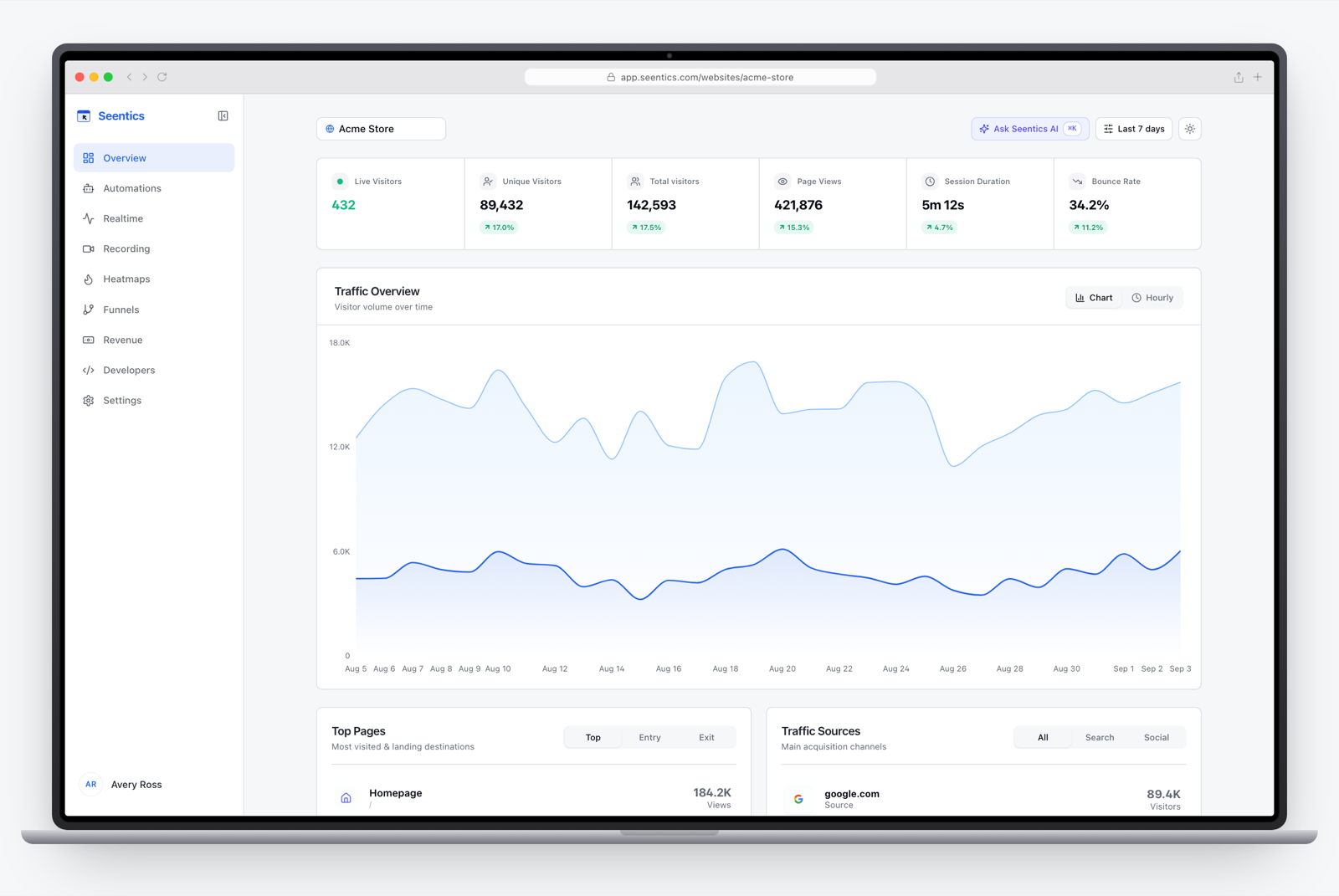
The Seentics dashboard.
Good for: teams that want heatmaps without sending behavioral data to another vendor, or that want one tool for analytics, replay and heatmaps. See self-hosted analytics for the trade-offs of running it yourself.
Keep in mind: Seentics offers click, scroll-depth and screenshot heatmaps; if move maps are a hard requirement, check the current feature list. And we're the authors of this post, so weigh our entry accordingly and try the others too.
Comparison table
Information as of October 2026, from each vendor's pages. "Not found" means we couldn't confirm it on the pages we checked.
| Tool | Free option | Paid entry point | Heatmaps | Session replay | Hosting |
|---|---|---|---|---|---|
| Microsoft Clarity | Free, no stated traffic limits | n/a | Yes | Yes | Hosted |
| Hotjar / Contentsquare | Contentsquare free plan (new Hotjar signups closed) | Not listed | Yes | Yes | Hosted |
| Crazy Egg | Trial only | $29/mo (annual) | Yes | Yes | Hosted |
| Mouseflow | 500 sessions/mo | $25/mo | Click, scroll, geo | Yes | Hosted |
| Lucky Orange | 7-day trial | $32/mo (annual) | Yes | Yes | Hosted |
| VWO Insights | 30-day trial | Not found | Yes, plus scrollmaps | Yes | Hosted |
| Smartlook | Closed to new subscriptions | n/a | Yes | Yes | Hosted |
| PostHog | Free plan, 3 heatmap pages | Pay-as-you-go | Click, scroll, movement | Yes | Cloud or self-host |
| Seentics | Open source | n/a (self-host) | Click, scroll depth, screenshots | Yes | Self-hostable |
Which one should you pick?
- Just want to try heatmaps for free: Clarity first. Mouseflow's free plan is a second option if you prefer a dedicated tool.
- Marketing team, predictable plan, A/B testing too: Crazy Egg or Lucky Orange, or VWO if testing is the core workflow.
- Product team, already on a product analytics platform: PostHog.
- Care about data ownership or privacy: a self-hostable option such as Seentics keeps the data on your infrastructure. For why that matters, see privacy-first analytics.
- Currently on Hotjar or Smartlook: plan your move now rather than at the deadline.
Whichever you choose, run it on one high-value page first, split by device, wait for enough traffic, and pair what you see with replays.
Photo by Carlos Muza on Unsplash.
FAQ
Are there really free heatmap tools for websites?
Yes. Clarity is described by Microsoft as free with no traffic limits, Mouseflow has a small free plan, PostHog has a free plan limited to three heatmap pages, and Contentsquare has a free plan. Seentics is open source and free to self-host, though you pay for your own infrastructure.
How much traffic do I need for a heatmap to be reliable?
There's no magic number. The practical test is whether a handful of unusual sessions could change the picture. Wait until the pattern is stable, and split by device because each device needs its own sample.
Do heatmaps hurt page speed?
Any added script has a cost, and recording tools differ in how they load. Load the tracker deferred, test your page speed before and after, and check how the vendor documents performance impact.
Are heatmaps compliant with GDPR?
It depends on the tool, what it records, and your lawful basis. Check whether it sets cookies, how it masks form inputs, and where data is stored, and take advice from your own counsel. Our post on GDPR analytics without a cookie banner covers the analytics side.
Heatmaps or session recordings: which do I need?
Both, in different roles. Heatmaps show patterns across many visitors; recordings show one visitor's path and explain the pattern. Start with the heatmap to find where, then watch recordings to learn why.
Can I use more than one heatmap tool?
You can, but it adds scripts and muddles your data. Pick one, learn it, and switch only if it lacks something you actually need.
Try it
If you'd like to see click and scroll heatmaps next to replay and funnels, the live Seentics demo needs no signup, and the code is on GitHub.