Microsoft Clarity Alternatives (and When Clarity Is Enough)
Looking for Microsoft Clarity alternatives? A fair comparison of Hotjar, Mouseflow, PostHog, OpenReplay and Seentics, plus when free Clarity is plenty.
Microsoft Clarity Alternatives (and When Clarity Is Enough)
Microsoft Clarity is a genuinely good product, and it costs nothing. That is exactly why so many teams install it first, and why the search for Microsoft Clarity alternatives usually starts later, when something specific starts to hurt: a privacy review, a consent-banner headache, a recording you needed from five weeks ago, or a legal team asking where the data lives.
This guide is a fair look at what Clarity does well, where its limits are (verified against Microsoft's own documentation), and which alternatives make sense for which problem. Some of the answers are "keep using Clarity". Comparisons are accurate as of October 2026, but vendors change plans often, so double-check anything that affects a purchase.
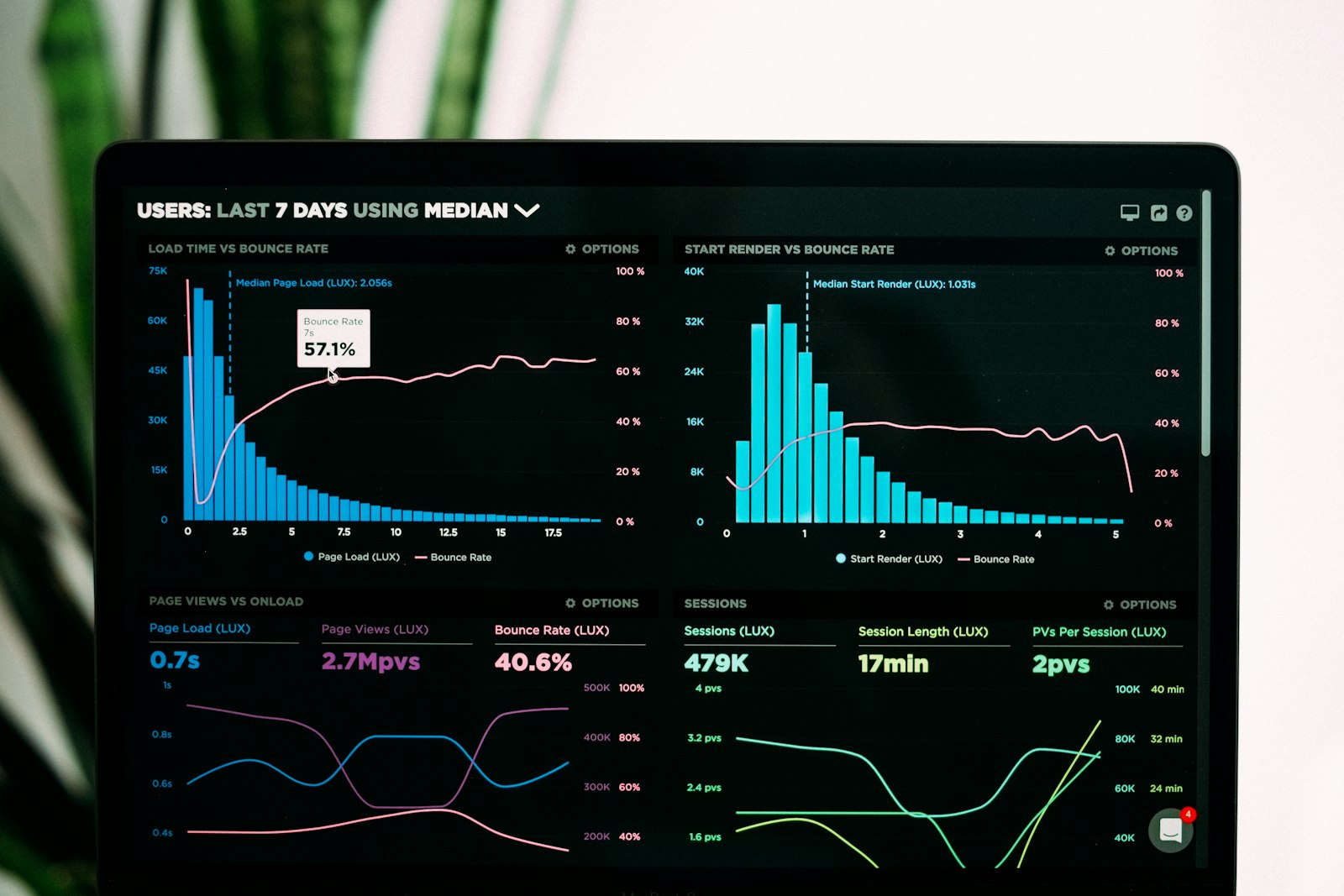
Photo: Unsplash.
TL;DR
- Clarity is enough if you want free session recordings and heatmaps, you are fine with a hosted Microsoft service, 30-day recording retention is acceptable, and you can handle consent signals for visitors in the EEA, UK and Switzerland.
- Look elsewhere if you need to self-host, keep data off a third-party cloud, retain replays longer by default, delete a single user's data, or avoid consent plumbing altogether.
- Hotjar and Mouseflow are hosted, paid-tier tools with a more polished feedback and survey layer. PostHog and OpenReplay are open-source options for product teams and engineers. Seentics is an open-source, self-hostable, cookieless analytics platform that bundles replays, heatmaps, funnels and revenue in one place.
- A pragmatic middle path: use a cookieless analytics tool for the numbers and keep Clarity only for qualitative debugging, gated behind consent.
What Clarity does well
Credit where it is due. According to Microsoft's Clarity FAQ:
- It is free, with no traffic limits. Microsoft describes Clarity as free forever, with no sampling and no limit on the number of sites per account.
- It covers the basics. Session recordings, heatmaps and machine-learning-driven insights are included.
- Setup is quick. One script, and you get a dashboard. The collection code is open source on GitHub, although the platform that stores and processes your data is not something you can run yourself.
- It scales. Microsoft says Clarity processes more than a petabyte of data a month, so you will not outgrow it technically.
If your site is a marketing page, a small store or a content site, and your goal is "watch some sessions and see where people click", Clarity is a perfectly rational choice. Do not pay for a tool before you have hit a limit that Clarity cannot solve.
Where Clarity's limits show up
None of these are flaws so much as trade-offs that come with a free, hosted service. Each one below is taken from Microsoft's official documentation.
1. Recording retention is 30 days
The FAQ states that Clarity retains recordings for 30 days from the time of recording. Favorited recordings and a random sample of recordings are kept for up to 9 months. If you investigate a bug report a month after it happened, or want to build a library of customer sessions, you will need to favorite recordings in advance.
2. No self-hosting
Your data is stored in Microsoft Azure, and the FAQ says Microsoft/Clarity has access to it. There is no self-hosted edition. For many teams that is fine. For teams under strict data-residency rules, or those who simply want to avoid sending behavioral data to another company, it is a dead end.
3. Consent is now part of the deal
Microsoft's consent mode documentation says that starting October 31, 2025, Clarity enforces consent signal requirements for visits from the European Economic Area, the UK and Switzerland, and that a valid consent signal is required for full functionality for those users. Consent mode is on by default for those regions, and Clarity sets its cookies only after valid consent.
The FAQ adds that without proper consent, Clarity limits data collection in those regions. In practice that means you need either a supported consent management platform or custom code calling Clarity's consent API, and your replay coverage for European visitors will reflect how many people accept your banner.
4. Deleting one user's data means deleting the project
On the question of deleting data for a specific user, the FAQ says you need to delete the entire project. If you receive individual erasure requests, that is a real operational constraint. (The same FAQ describes Clarity as GDPR-compliant as a data controller. That is Microsoft's statement about its own role; your obligations as a site owner still apply.)
5. Cookies are part of the product
Clarity identifies users through a first-party cookie, and the FAQ confirms you need to inform users about the cookie it uses. That is not unusual, but it means Clarity cannot be your "no cookie banner needed" tool.
6. It is a behavior tool, not an analytics suite
Clarity is not trying to replace a full analytics platform with revenue attribution or multi-step funnel reporting. If you are using it as your only analytics, you will eventually miss those. (It does integrate with Google Analytics, according to the FAQ.)
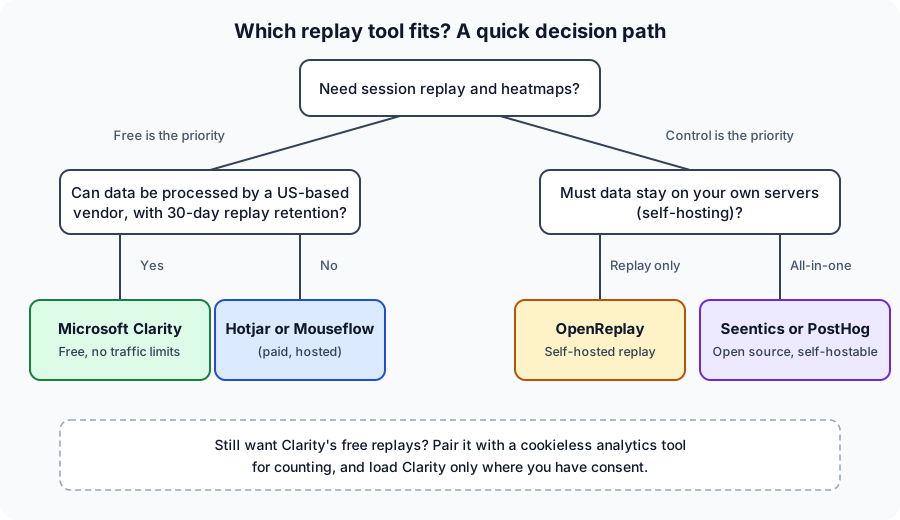
Decision path: start from what you can compromise on. Free and hosted points to Clarity; control points to self-hostable tools.
Microsoft Clarity alternatives compared
Here are the tools worth shortlisting. I have kept claims to what each vendor documents and avoided quoting prices, which change often. Check each vendor's pricing page before deciding.
Hotjar
Hotjar is the best-known "Clarity vs Hotjar" comparison, and the two overlap heavily: recordings and heatmaps, plus on-site surveys and feedback widgets that Clarity does not emphasize. Hotjar is a hosted product, now part of Contentsquare (its pricing page redirects to Contentsquare). It is a strong fit for marketers and UX researchers who want surveys alongside replays and are happy to pay for a polished hosted tool. It is not self-hostable.
Mouseflow
Mouseflow is a hosted behavior-analytics tool with recordings, heatmaps, funnels and form analytics, and it is popular with conversion-optimization teams. As with Hotjar, you trade money for a more specialized feature set and support, and your data lives with the vendor.
PostHog
PostHog is an open-source product analytics suite that includes session replay alongside event analytics, feature flags and experiments. It suits product and engineering teams who want one platform for the whole product lifecycle. It is broader (and heavier to learn) than a simple replay tool. Check PostHog's current docs for their hosting and retention options.
OpenReplay
OpenReplay is an open-source session replay platform built to be self-hosted, with developer tooling such as network and error context. Its homepage emphasizes self-hosting and keeping data off third-party processors. It is the most direct answer to "I like replays, but I want them on my own infrastructure". It is oriented toward engineering teams.
Seentics
Seentics is open source (AGPL v3.0) and self-hostable, with privacy-first analytics that use no cookies or fingerprinting. Where Clarity focuses on behavior, Seentics puts the analytics and the behavior tools in one place: real-time dashboards, session replays (recorded with rrweb, with rage-click and JavaScript error detection), heatmaps (click maps, scroll depth and page screenshots), funnels with drop-off rates, revenue and UTM attribution, events and goals (including CSS-selector conversions), behavioral automations, and natural-language AI queries.
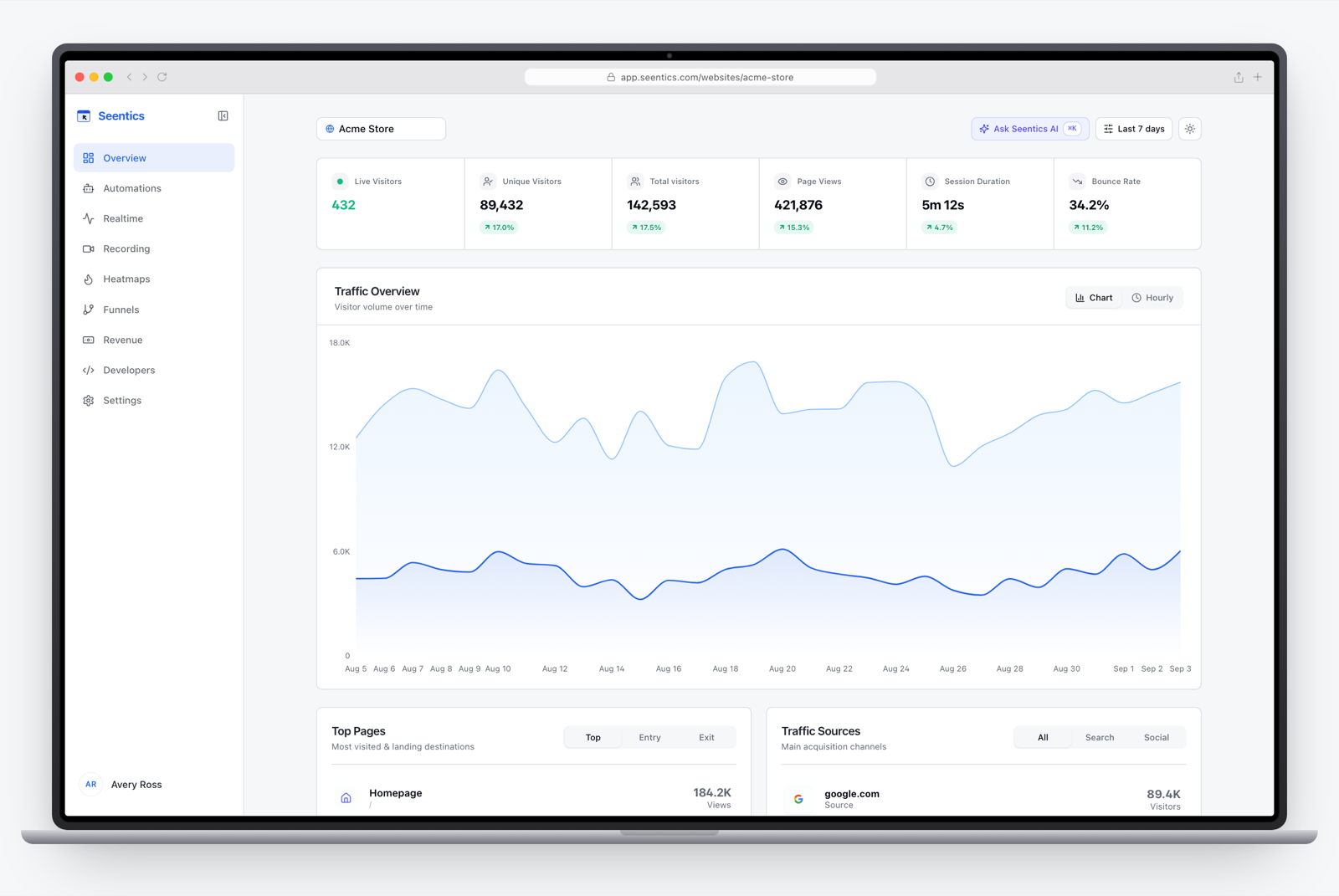
The Seentics dashboard: traffic, sessions and behavior in one place.
The trade-off: you run it yourself (or use the hosted demo to evaluate), and it is a younger project than Hotjar or Clarity. If you want zero ops, a hosted free tool will always be easier.
A note on Smartlook
You may see Smartlook on older "Clarity alternatives" lists. Cisco's lifecycle notice says it reached end of sale on May 31, 2026, so it is not a sensible choice for a fresh start. See the Cisco notice.
Microsoft Clarity vs Seentics, head to head
A fair table. Clarity facts come from Microsoft's documentation; Seentics facts come from its README.
| Microsoft Clarity | Seentics | |
|---|---|---|
| Price | Free, no traffic limits | Open source (AGPL v3.0); self-host freely |
| Hosting | Microsoft Azure only | Self-hostable |
| Who can access your data | Microsoft/Clarity | You, when self-hosted |
| Session replay | Yes | Yes (rrweb, rage-click and JS error detection) |
| Heatmaps | Yes | Yes (click, scroll depth, screenshots) |
| Funnels and drop-off | Not its focus | Yes, with drop-off rates |
| Revenue and UTM attribution | Not its focus | Yes |
| Cookies | First-party cookie; consent required in EEA, UK, CH | No cookies, no fingerprinting |
| Recording retention | 30 days (favorites and a sample up to 9 months) | Depends on your own storage |
| Delete one user's data | Delete the whole project | Check the docs for your version |
| AI features | ML insights, AI summaries and chat | Natural-language AI queries |
| Setup effort | Minutes | A deployment, or a hosted option to try |
The honest summary: Clarity wins on zero cost and zero ops. Seentics wins on control, cookieless collection and an all-in-one feature set. They answer different priorities, so which is better depends entirely on yours.
When Clarity is enough
Stay with Clarity if all of these hold:
- You mostly want to watch sessions and view heatmaps.
- Your traffic is not heavily EEA, UK or Swiss, or you already run a consent platform that can pass signals to Clarity.
- You review recordings within a few weeks and are happy to favorite the keepers.
- Hosting by Microsoft is acceptable to your legal and security teams.
- You have separate tools for funnels and revenue, or do not need them yet.
If you are weighing this up for a small site, do not overthink it. Run Clarity, and revisit when a limit bites.
When to switch
Move to an alternative when one of these becomes true:
- Compliance or procurement requires self-hosting. Pick OpenReplay for replay only, or Seentics or PostHog if you want analytics in the same stack.
- Consent gating guts your data. If your European sessions mostly disappear behind the banner, a cookieless approach gives you fuller coverage. See our guide to GDPR analytics without a cookie banner.
- You need funnels, revenue and replays connected. Jumping between a replay tool and an analytics tool slows every investigation. See funnel analysis.
- You want on-site surveys and a polished UX-research workflow. Hotjar is built for that.
- You want everything under one roof as a product team. PostHog is built for that.
Option: Clarity plus privacy-first analytics
You do not have to choose one. A setup that works well for many sites:
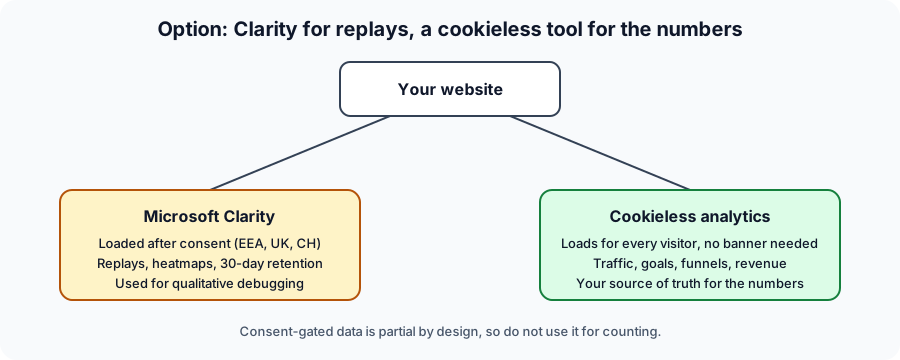
Two tools, two jobs: qualitative replays behind consent, quantitative numbers without it.
- Use a cookieless analytics tool for counting. It loads for every visitor, so traffic, goals, funnels and revenue reflect everyone, not just people who clicked "accept".
- Load Clarity only after consent. Either rely on its consent mode and a supported consent platform, or inject the script yourself once consent exists. You will see sessions from consenting visitors only, which is fine for qualitative debugging.
- Never mix the two for totals. Consent-gated replay data is partial by design. Use it to understand why, and the analytics tool to measure how many.
With Seentics as the analytics layer, the tracker is a single deferred script tag:
<script defer src="https://YOUR-SEENTICS-HOST/trackers/seentics.js" data-website-id="YOUR_WEBSITE_ID"></script>
Replace the host and website ID with your own values. Seentics also exposes a small JavaScript API (seentics.track, identify, page and flush) for custom events.
This pairing costs nothing extra beyond hosting, keeps your headline numbers honest, and leaves the free Microsoft tool doing what it is best at. If you later decide you would rather have replays on your own servers too, the replay features in Seentics are already there and you can drop Clarity.

Photo: Unsplash.
How to choose in 15 minutes
- Write down your two non-negotiables (for example: free, self-hosted, surveys, funnels, EU data).
- Shortlist two tools that satisfy both.
- Install both on a low-risk part of your site for two weeks.
- Pick the one that helped you fix a real problem faster, not the one with the longer feature list.
For background on what each behavior tool does, see our guides to session replay and heatmaps.
FAQ
Is Microsoft Clarity really free?
Yes. Microsoft's FAQ describes it as free forever, with no traffic limits and no sampling. The trade-offs are hosting, retention and consent requirements, not price.
How long does Clarity keep session recordings?
According to Microsoft's FAQ, 30 days from the time of recording. Favorite recordings and a random sample of recordings are retained for up to 9 months.
Is Clarity GDPR compliant?
Microsoft states that Clarity is GDPR-compliant as a data controller. As a site owner you still have your own obligations. Since October 31, 2025, Clarity enforces consent signal requirements for visitors from the EEA, UK and Switzerland, so you need to pass valid consent for full functionality there. This is not legal advice; check with your counsel.
What is the best Clarity vs Hotjar choice?
If free recordings and heatmaps are all you need, Clarity. If you want surveys, feedback widgets and a polished UX-research workflow and can pay for them, Hotjar. Neither is self-hostable.
Can I self-host Microsoft Clarity?
No. Clarity data is stored in Microsoft Azure and the service is hosted by Microsoft. The collection script is open source, but the platform is not. For self-hosting, consider OpenReplay, PostHog or Seentics.
Can I use Clarity and another analytics tool together?
Yes, and it is common. Many sites use a primary analytics tool for traffic and conversions and Clarity for qualitative replays. Just keep consent handling consistent and avoid treating Clarity data as complete counts.
Try it yourself
If you want to see what an open-source, cookieless alternative looks like, explore the live demo or browse and self-host from GitHub. Whatever you choose, run it next to your current setup for a couple of weeks before you commit.