
How to Reduce Bounce Rate: Find Out Why Visitors Leave (With Recordings and Heatmaps)
How to reduce bounce rate by finding out why visitors leave first. A workflow using segmentation, heatmaps and recordings, plus fixes.
You open your analytics, see a bounce rate that looks too high, and a familiar urge kicks in: change the headline, add a popup, shorten the page, anything. Two weeks later the number has moved a little, or not at all, and you have no idea why.
The problem is that bounce rate tells you that people left. It says nothing about why. If you want to know how to reduce bounce rate in a way that sticks, you have to treat the number as a smoke alarm, not a diagnosis. This guide shows how to define it correctly, work out which visitors are bouncing, watch what actually happens to them, and make one targeted fix at a time.
Photo: Unsplash.
TL;DR
- Bounce rate is not one universal metric. In GA4 it is the share of sessions that were not engaged; in the older Universal Analytics sense it meant single-page sessions. Know which one you are looking at before comparing anything.
- A high bounce rate is only a problem when the page is supposed to lead somewhere. A blog post that answers a question and gets closed is not necessarily failing.
- Do not guess. Segment by traffic source, device and landing page, then use heatmaps and session recordings on the worst segment to see what visitors actually do.
- The usual causes: slow loading, a mismatch between what was promised and what the page delivers, a weak first screen, a broken mobile experience, intrusive popups, and forms that ask too much.
- Change one thing, measure the same segment before and after, and repeat.
What bounce rate actually means
"Bounce rate" has meant two different things, and mixing them up is the most common reason people argue about benchmarks.
The traditional definition (Universal Analytics, which Google retired in 2023): a bounce is a session in which the visitor viewed a single page and did not trigger any further interaction request. Bounce rate is single-page sessions divided by all sessions. Under that definition, someone who reads your entire article for ten minutes and then closes the tab counts as a bounce.
The GA4 definition is built on a different idea. According to Google's documentation on engagement rate and bounce rate, an engaged session is one that meets any of these criteria:
- It lasts longer than 10 seconds.
- It has a key event.
- It has 2 or more page or screen views.
Engagement rate is the percentage of sessions that were engaged, and bounce rate is the percentage of sessions that were not engaged. The two always add up to 100%.
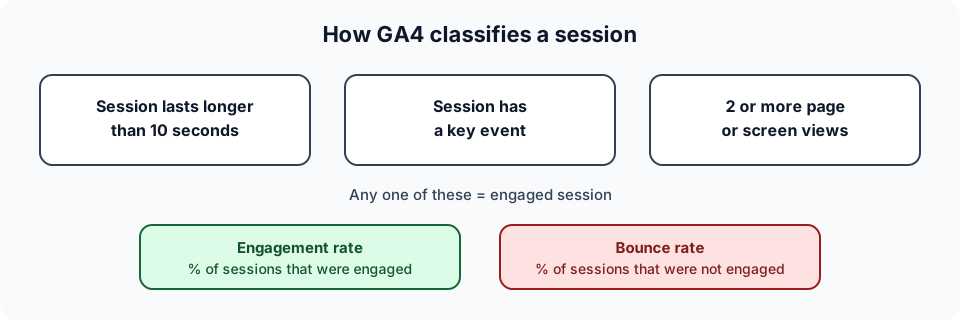
GA4 session classification, based on Google's published definitions.
This matters in practice. The same page can show very different bounce rates in different tools, because "bounced" means something different in each. A reader who spends five minutes on a single article is an engaged session in GA4 but a bounce under the traditional definition. Other analytics tools define bounce in their own way, so always check the definition in the tool you use.
Bounce rate is not the same as exit rate
An exit is the last page of any session, including sessions that went through several pages. A bounce is a session that ended after one page (or, in GA4, a session that was not engaged). A visitor who browses five pages and leaves from the pricing page contributes an exit to pricing but no bounce at all.
What about benchmarks?
You will find plenty of "average bounce rate" tables online, usually split by industry. I have deliberately not reproduced any here. Most of them do not say which definition they used, which tool measured them, or what traffic mix they cover, so they are close to useless for deciding whether your number is bad. A better benchmark is your own history, split by segment: your organic traffic last quarter versus this quarter, your mobile visitors versus your desktop visitors, one landing page versus the page next to it.
Is a high bounce rate actually a problem?
Not always. Before you spend a week fixing something, ask what the page is for.
- A single-answer page (a blog post, a documentation article, a contact-details page) can do its job in one visit. Visitors read, get the answer, and leave satisfied. A high bounce rate there is expected.
- A page that is supposed to move people along (a landing page, a product page, a pricing page, a signup page) has a problem when most visitors leave without taking a next step.
The question to ask is not "is this number high?" but "are people who should continue leaving instead?" That is why bounce rate is most useful when you look at it alongside what you wanted visitors to do next, and why funnel analysis and goal tracking give it meaning. A page with a high bounce rate and a healthy conversion rate is probably fine. A page with a modest bounce rate and almost no conversions may be the bigger problem.

Photo: Unsplash.
How to reduce bounce rate: the diagnosis workflow
Most bounce-rate advice is a list of tips applied blindly. A more reliable approach is a loop: narrow down where the problem is, look at what visitors do there, form a hypothesis, fix one thing, and measure.
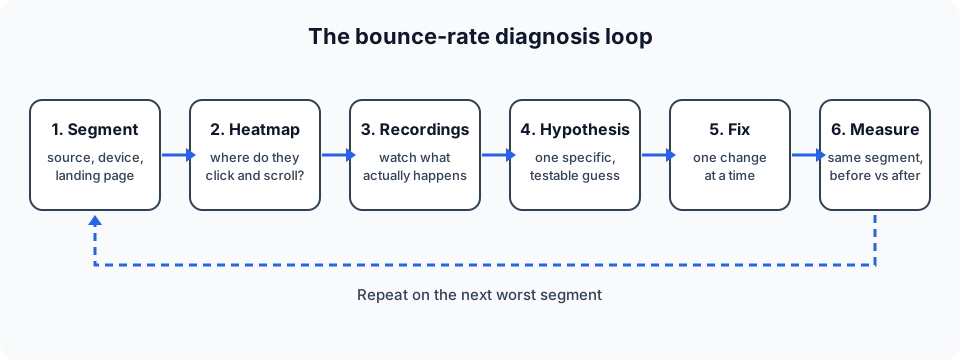
The diagnosis loop. Each pass should end with a measured result, not a feeling.
Step 1: Segment before you do anything else
An overall bounce rate is an average of very different visitors. Break it down until the problem shows itself:
| Segment | What it can reveal |
|---|---|
| Traffic source (organic, paid, social, email, referral) | Whether a specific channel brings the wrong audience or sets the wrong expectation |
| Device (mobile, tablet, desktop) | Layout, speed or usability problems on one device class |
| Landing page | Which specific pages leak visitors, rather than "the site" |
| Campaign or UTM | A single ad, email or post that over-promises |
| New vs returning | Whether first impressions or repeat journeys are the issue |
| Country or language | Language mismatch, currency, or slow delivery in certain regions |
You are looking for the segment with a high bounce rate and meaningful volume. A page with 20 visits and a 90% bounce rate is noise. A page with 8,000 visits, of which a large share come from one paid campaign on mobile, is a lead.
If your analytics tool supports UTM and source breakdowns, this takes minutes. Seentics, for example, includes revenue and UTM attribution alongside its real-time analytics, so you can compare sources without exporting anything.
Step 2: Look at the page with a heatmap
Once you have one landing page and one segment, a heatmap shows what visitors do on that page in aggregate. For bounce analysis, three views matter:
- Click map. Are visitors clicking the thing you want them to? Are they clicking things that are not clickable, such as an image or a heading, which signals a misleading design?
- Scroll depth. How far down does the typical visitor get? If most people never scroll past the first screen, everything below it is invisible to them. If they scroll deep but do not act, the problem is probably the offer or the call to action, not the layout.
- Page screenshot context. Heatmaps are only readable against the page as it looked. Seentics captures a page screenshot with its heatmaps so the data stays interpretable even after you redesign.
A heatmap answers where. It does not answer why, which is the next step.
Step 3: Watch recordings of the bouncing segment
Session recordings are where the diagnosis usually becomes obvious. Filter to the segment you identified, such as mobile visitors from one campaign who left within a few seconds, and watch a handful of sessions.
Look for patterns, not individual quirks. Things worth noticing:
- The page jumping around while loading, so the visitor misses the button they were aiming for.
- A visitor tapping on something that does not respond.
- Repeated rapid clicks on the same spot, a frustration signal covered in our rage clicks guide. Seentics' session replays flag rage clicks and JavaScript errors, so you can jump straight to those sessions rather than watching hours of footage.
- A cookie banner, popup or chat widget covering the main content on a small screen.
- A visitor scrolling up and down looking for something that is not there, then leaving.
- A form field that rejects input without a clear message.
Five to ten sessions from the same segment is usually enough to spot a recurring pattern. If you see three different problems, you have three hypotheses to test, not one.
Recordings can capture sensitive information, so make sure your tool masks inputs and that your setup respects privacy rules. Seentics is built to be privacy-first, with no cookies or fingerprinting, but you should still review what you record on forms.
Step 4: Write a hypothesis
Turn what you saw into a sentence that can be wrong:
"Mobile visitors from the spring email campaign leave because the hero image pushes the call to action below the first screen. If we make the call to action visible without scrolling, fewer of them will bounce."
A good hypothesis names the segment, the cause and the expected change. "Make the page better" is not a hypothesis.
Step 5: Make one change
Resist the urge to redesign everything. If you change the headline, the image, the button colour and the form in one go, you will not know which one mattered, or whether one of them made things worse. Change one thing, or one tightly related group of things.
Step 6: Measure the same segment
Compare the same segment before and after, over a comparable period, with enough traffic to trust the result. Watch the metric that reflects the page's job as well as bounce rate: clicks on the main call to action, form completions, or progress through the funnel. A lower bounce rate with no improvement in what visitors do next is a cosmetic win. For a deeper treatment of testing changes properly, see our guide to conversion rate optimization with analytics.
Concrete fixes for the most common causes
These are the causes that show up most often once you have done the diagnosis. Treat them as things to check for, not a checklist to apply blindly.
Speed: visitors will not wait
If recordings show visitors staring at a blank or half-loaded page, speed is the first suspect. Google's Core Web Vitals guidance gives concrete targets, assessed at the 75th percentile of page loads and segmented across mobile and desktop:
| Metric | What it measures | "Good" threshold |
|---|---|---|
| Largest Contentful Paint (LCP) | How quickly the main content appears | 2.5 seconds or less |
| Interaction to Next Paint (INP) | How quickly the page responds to input | 200 milliseconds or less |
| Cumulative Layout Shift (CLS) | How much the layout moves unexpectedly | 0.1 or less |
Common fixes: compress and properly size images, serve them in modern formats, avoid loading large scripts before the content, reserve space for images and embeds so the layout does not jump, and remove third-party scripts you no longer use. Do not forget your analytics itself: a heavy tracking script is part of the page weight.
Intent match: the page must deliver what the click promised
This is the most common cause of a high bounce rate on paid and social traffic, and the one a speed audit will never find. A visitor clicks an ad that says "Free template," lands on a page that says "Book a demo," and leaves in two seconds. Nothing is broken; the page simply answers a different question.
Check, for each traffic source:
- Does the headline echo the promise in the ad, email subject or search snippet?
- Is the offer on the page the same offer that was advertised?
- For organic search, does the page answer the query the visitor typed, rather than a related one that is easier for you to write about?
If a campaign consistently over-promises, the fix is often to rewrite the ad or snippet, not the page.
Above the fold: earn the next three seconds
Visitors form a judgement from the first screen. Use the scroll-depth heatmap to learn how many people never leave it, then make sure that screen contains:
- A headline that says what this is and who it is for.
- One supporting line that adds the main benefit.
- One clear next action, visible without scrolling on a typical phone.
- Visual proof that the page is credible, such as a real product screenshot rather than a generic stock image.
If the click map shows visitors clicking a non-clickable image or a heading, make it a link or remove the visual cue that implies it is one.
Mobile: test it on a real phone
A page can look fine in a desktop browser's responsive mode and still be awkward on a real phone. Filter your recordings to mobile and watch for tiny tap targets, horizontal scrolling, text that needs zooming, sticky bars that eat a third of the screen, and menus that do not open. If the mobile bounce rate is far higher than desktop for the same page, you almost certainly have a mobile-specific defect, and it is usually quick to find.
Popups and overlays: delay the interruption
A full-screen newsletter popup that fires the instant the page loads gets in the way before the visitor knows whether the page is worth their time. Cookie banners, chat widgets and promotional overlays can stack on top of one another on a small screen. In recordings, look for visitors who immediately hunt for the close button. Better options: trigger overlays after meaningful engagement rather than on load, make them easy to dismiss, and make sure only one appears at a time.
Forms: ask for less
If the page's purpose is a signup or enquiry, the form is often where visitors leave. Recordings reveal the details: a field that wrongly rejects a valid phone number, a required field that nobody understands, a password rule that is only explained after failure. Cut optional fields, mark required ones clearly, show validation messages next to the field, and ask for the minimum you need to follow up. Track the form as a conversion goal so you can see whether changes actually help. Seentics supports goals including CSS-selector conversions, which makes this possible without writing code.
A worked example (hypothetical)
The following is an illustrative scenario with invented numbers. It is not a real customer or real data.
Imagine a small online store selling kitchen equipment. In the analytics dashboard, the overall bounce rate looks high, but nobody agrees why.
Step 1: Segment. Splitting by traffic source, organic and email look normal. A paid social campaign driving traffic to a single product page stands out: lots of visits, very few add-to-cart clicks, and a bounce rate well above the rest of the site. Splitting that further by device, the problem is concentrated on mobile.
Step 2: Heatmap. The mobile scroll-depth heatmap for that product page shows that almost nobody scrolls past the first screen. The click map shows a cluster of taps on the product photo, which is not a link.
Step 3: Recordings. Watching eight mobile sessions from that campaign, the team notices that the page loads the product photo late, the layout shifts, and the "Add to cart" button sits well below the first screen behind a large hero image. Three visitors tap the photo repeatedly, expecting it to enlarge. Two sessions show a cookie banner covering the price.
Step 4: Hypothesis. "Mobile visitors from the paid social campaign leave because the price and Add to cart button are not visible on the first screen and the page shifts as it loads. If we make the price and button visible without scrolling and fix the layout shift, more of them will add to cart."
Step 5: Fix. The team reduces the hero image height on mobile, moves the price and button above the fold, reserves space for the image so the layout stops jumping, and makes the photo open a zoomed view when tapped. They change nothing else.
Step 6: Measure. Over the following two weeks they compare the same segment (mobile, that campaign, that page) with the previous two weeks. They look at the bounce rate, but more importantly at add-to-cart clicks and progress into the checkout funnel. If add-to-cart clicks rise and the bounce rate falls, the hypothesis held. If the bounce rate falls but add-to-cart does not move, they have fixed a symptom and the next pass starts with the recordings again.
The point is not the specific fix. It is that every step used evidence from the same segment, and the result was judged by what visitors did next.
Mistakes that keep bounce rate high
- Optimising the average. A site-wide number hides the segment that is actually broken.
- Chasing a low number as the goal. You can lower bounce rate by forcing a second pageview, for example by splitting an article into five pages. That improves the metric and worsens the experience.
- Comparing against other people's benchmarks. Different tools define bounce differently, as covered above.
- Fixing several things at once. You will not learn what worked.
- Ignoring traffic quality. Sometimes the page is fine and the channel is wrong. Lowering bounce rate by buying less irrelevant traffic is a valid fix.
Getting the data to do this
To follow this workflow you need segmentation, heatmaps and session recordings in the same place, ideally without a cookie banner of your own adding to the problem. Seentics is an open-source, self-hostable, privacy-first analytics platform that includes real-time analytics, session replays with rage-click and error detection, click and scroll-depth heatmaps, funnels with drop-off rates, and goals. You can explore a live example in the demo or read the source and self-host it from the GitHub repository. Any tool that gives you the same three views will support the workflow; the method matters more than the product.
FAQ
What is a good bounce rate?
There is no single good number, because it depends on the page type, the traffic source and how your tool defines a bounce. A blog post can legitimately have a high bounce rate; a checkout page should not. Compare your own pages and segments against their own history rather than against published averages.
What is the difference between bounce rate and engagement rate in GA4?
According to Google's documentation, engagement rate is the percentage of sessions that were engaged, and bounce rate is the percentage of sessions that were not engaged. An engaged session lasts longer than 10 seconds, has a key event, or has 2 or more page or screen views. The two rates add up to 100%.
Is a high bounce rate bad for SEO?
This post does not claim that bounce rate is a ranking factor, because we could not verify that from an official source. What is safe to say is that a high bounce rate on a page that is supposed to satisfy a search query is a useful signal to you that the page may not match what searchers wanted, and fixing that is worth doing regardless of search engines.
How do I reduce bounce rate on mobile?
Segment by device first, then watch mobile recordings of that page. Typical culprits are slow loading, layout shifts, tiny tap targets, overlays covering content, and a call to action hidden below the first screen. Fix what the recordings show rather than applying a generic mobile checklist.
How long does it take to see results?
It depends on your traffic. You need enough sessions in the segment you changed to compare like with like, so a high-traffic page may show a result in days and a low-traffic one may take weeks. Compare the same segment over comparable periods, and look at conversions as well as bounce rate.
Google's definitions were checked against Google Analytics Help and web.dev in October 2026.