
Poptin Alternatives: 9 Popup and Lead Capture Tools Compared (2026)
Looking for a Poptin alternative? Compare Popupsmart, Poper, OptinMonster, Privy, Wisepops, email-platform forms and Seentics by pricing basis, targeting, integrations and privacy, with a migration checklist.
Poptin Alternatives: 9 Popup and Lead Capture Tools Compared (2026)

Poptin is a well-reviewed popup and form builder. On Capterra it holds a 4.8 rating from several hundred reviews, and reviewers praise ease of use and support. So if you are searching for a Poptin alternative, you probably are not escaping a broken product. The reasons are usually more specific: pricing sized by visitors, a wish to see what happens after a popup is shown, a privacy review, or a desire to stop adding another third-party script.
This guide compares nine options (Popupsmart, Poper, OptinMonster, Privy, Wisepops, your email platform's own forms, a DIY modal, Seentics and Poptin itself as the baseline), explains who each one fits, and ends with a migration checklist. Comparisons are as of October 2026. Prices are what third-party and vendor pages listed when we checked, and they change, so confirm them on the vendor's own page.
Photo from Unsplash.
TL;DR
- Want a like-for-like popup builder: Popupsmart or Poper match Poptin's template-and-form approach.
- Want a mature ecosystem with deep targeting: OptinMonster.
- Run an online store with email and SMS: Privy.
- Want popups tied to real behavior and measurable results, with optional self-hosting: Seentics.
- Be clear about the gap: Seentics now captures emails in popups, lists each form's submissions for 90 days and sends them to your email tool, CRM or a webhook, and also offers spin-to-win wheels, countdown timers, multi-step quizzes, sticky bars, teaser tabs and coupon codes. It does not yet have a drag-and-drop canvas, a template library as large as Poptin's, or the long tail of integrations Poptin offers. It does send new leads to Zapier or any webhook, Mailchimp, Klaviyo and HubSpot. If your main job is polished, template-driven email capture with a wide integration catalogue, a dedicated tool fits better today.
- Test with one campaign on one page for two weeks before migrating everything.
Why people look beyond Poptin
1. Pricing that scales with visitors
Poptin's free plan is listed at 1,000 visitors a month on one domain. Capterra lists Basic at $25 per month (10,000 visitors), Pro at $59 (50,000 visitors, 4 domains) and an Agency tier at $119 (150,000 visitors); another source says those prices assume annual billing. We could not load poptin.com itself, so check the current figures there.
The structural point matters more than any number. When the plan is sized by site visitors or pageviews, a good traffic month can push you up a tier even if the popup is only shown to a small share of those visitors.
2. Popups in a silo
A popup tool tells you how many people saw a message and how many submitted. It rarely tells you what they did next, which campaign brought them or whether they later bought. That takes analytics, funnels and sometimes session replay, usually in another product. Our conversion rate optimization guide covers why that join matters.
3. One more third-party script
Every widget adds a script and a data processor. Teams that minimize processors or want data in their own environment find consolidation attractive. See privacy-first analytics.
4. Feature fit
Capterra reviewers mention a learning curve, some confusing menus (A/B testing in particular), and a wish for more integrations and better mobile exit intent. These are mild complaints, not failures, but they show where a replacement could differ.
What to check in any replacement
| Question | Why it matters |
|---|---|
| What sizes the plan (visitors, pageviews, contacts)? | Determines how the bill reacts to growth. |
| Which triggers exist (exit intent, scroll, time, click, returning visitor)? | Targeting quality decides whether popups help or annoy. |
| Are mobile triggers supported? | Cursor-based exit intent does not exist on phones. |
| Where do leads go (a built-in list, email platform, webhook)? | Submissions must reach your CRM or list. |
| Can you measure what happens after the popup? | Without it you see form fills, not business impact. |
| Is consent handled? | Collecting emails needs a lawful basis and a clear notice. |
| Is there a free tier or trial? | Lets you test with real traffic first. |
The 9 options
1. Poptin (the baseline)
Poptin is a popup, form and lead capture builder with templates, targeting and integrations. Free plan: 1,000 visitors per month and one domain. Paid per Capterra: $25, $59 and $119 per month, with the lower figures tied to annual billing.
Best for: marketers who want a fast visual builder and a leads list. Trade-off: pricing follows visitors, and analytics beyond form results live elsewhere.
2. Popupsmart

Popupsmart is a dedicated popup builder with templates, targeting rules and form fields, and it publishes its own Poptin comparison. Its pricing page lists a free plan with 5,000 pageviews per month (one live popup, one website), then Basic at $39 per month (50K pageviews), Advanced at $69 (100K), Pro at $99 (250K) and Expert at $159 (500K), with 20% off annual billing.
Best for: teams that want the same style of tool at a different price. Trade-off: still a standalone widget, and its own comparison pages are promotional.
3. Poper

Poper lists a free plan with 10,000 monthly pageviews, one website, 100 leads and branded popups, with no A/B testing or team invites on free. Its marketing pages quote paid plans starting around $15 per month, though the pricing page shows a different figure, so confirm before budgeting.
Best for: small sites that want a cheap, simple popup tool. Trade-off: check advanced targeting and integrations against your needs.
4. OptinMonster

OptinMonster is a long-established lead capture platform with deep targeting and many integrations. Third-party sources list Basic, Plus, Pro and Growth plans from about $7 to $49 per month on annual billing, but one review says those are introductory rates and renewals are much higher (for example Pro around $72.50 per month on annual billing). Pro covers up to 3 sites and 25,000 monthly impressions; Growth covers 5 sites and 100,000. Treat these as unconfirmed until you read the current pricing page.
Best for: publishers and marketers who want a mature ecosystem. Trade-off: renewal pricing and impression limits need a close read.
5. Privy

Privy targets online stores with popups, email and SMS. Its pricing page lists Starter at $30 per month (up to 1,500 contacts) and Growth at $45 (adds SMS), and its help center describes a free tier for accounts under 100 mailable contacts, with Privy branding.
Best for: Shopify-style stores that want popups, email flows and SMS in one subscription. Trade-off: priced by contacts, and built around the commerce workflow.
6. Wisepops

Wisepops offers popups, bars and on-site messages. Published prices conflict across sources: Capterra lists plans from $49 per month (50K pageviews) up to $499, while Shopify App Store and competitor pages cite higher figures for larger traffic tiers. It offers a free trial but no free plan on Capterra.
Best for: teams that need richer on-site messaging and are comfortable with traffic-tiered pricing. Trade-off: confirm the exact price for your pageviews with the vendor.
7. Your email platform's own forms


Mailchimp, Klaviyo, ConvertKit and others ship popup forms that write directly to your list.
Best for: teams already living in one email tool. Trade-off: targeting is usually basic, and results sit apart from site analytics.
8. Build it yourself
A small modal, a form posting to your backend, and a few lines of JavaScript. Fine for one placement, painful to maintain across many.
Best for: engineering teams with one or two placements. Trade-off: no targeting UI, A/B testing or reporting unless you build it.
9. Seentics

Seentics is the one we build, so weigh this entry accordingly. It is open-source (AGPL v3), self-hostable, privacy-first analytics that works without cookies or fingerprinting. Its behavioral automations show modals and banners, fire webhooks, or redirect visitors based on behavior:
- Triggers: exit intent, time on page, scroll depth, element clicks and visit history.
- Conditions: country, region, city, browser, OS, device, referrer, visit count, new vs returning, and traits you pass with
seentics.identify(). - Popup types: simple popups, a spin-to-win wheel (the prize is drawn on the server and the coupon code is only sent with the winning slice, so it cannot be read from the page), multi-step quizzes whose answers are stored with the lead, countdown timers (per-visitor or fixed end date), teaser tabs, sticky bars with an inline email form, and coupon codes revealed after the email. A live preview in the builder runs the same code as your site.
- Lead capture: a modal can carry an email form (extra fields, consent checkbox, thank-you message). Submissions are listed on the automation's page with search, CSV export and delete (kept 90 days), are sent to the destinations each form picks (several per site, retried automatically), and each records which popup, A/B variant and page produced it. It is not a contact database: long-term contacts live in the tool you send them to.
- Measurement in the same product: funnels, goals (including CSS-selector conversions), heatmaps, session replays and revenue attribution, so you can check whether a popup moved a conversion and watch what visitors did next.
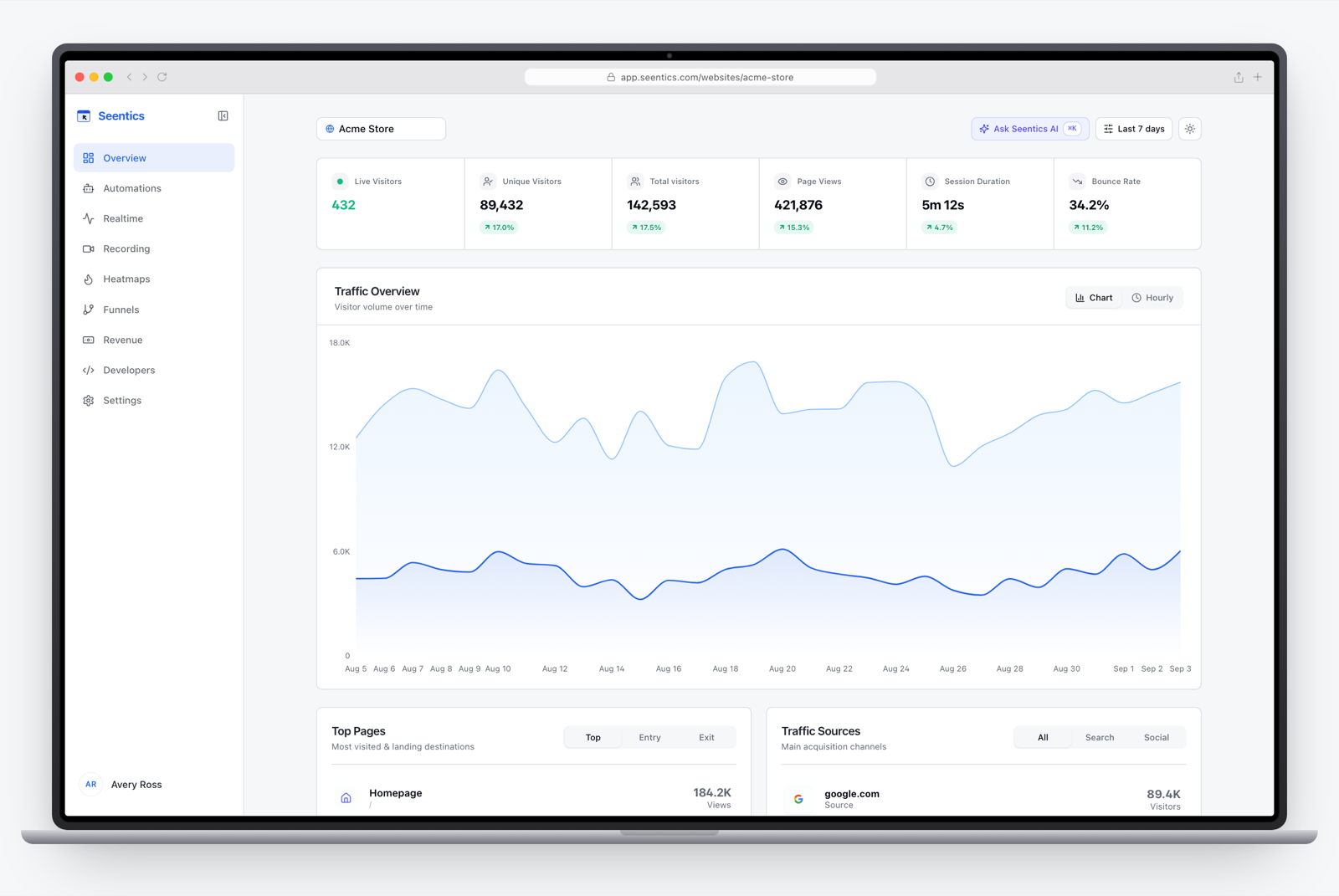
The Seentics dashboard.
See the behavioral automations guide for how triggers and conditions combine.
Best for: teams that want behavior-triggered messages connected to analytics, in a tool they can self-host. Trade-off, stated plainly: popups are configured with form-style editors and a live preview rather than a drag-and-drop canvas, and the template library is a handful of starters (spin-to-win, countdown bar, multi-step quiz, sticky bar, teaser tab, coupon reveal and a few email ones) rather than hundreds. Integrations are four: Zapier (or any HTTPS webhook), Mailchimp, Klaviyo and HubSpot, which covers a lot but is not Poptin's catalogue; anything else goes through Zapier, a webhook or a CSV export. If polished template-driven capture is the main job, pick a dedicated tool. Try the live demo without an account.
Comparison table (as of October 2026)
Figures are what we could read from vendor or third-party pages and may be stale. "Confirm" means sources conflicted.
| Tool | Free option | Entry paid price | Plan sized by | Self-host | Leads / email integrations |
|---|---|---|---|---|---|
| Poptin | 1,000 visitors / month | $25 (annual billing) | Visitors | No | Yes |
| Popupsmart | 5,000 pageviews / month | $39 (50K pageviews) | Pageviews | No | Yes |
| Poper | 10,000 pageviews / month | About $15 (confirm) | Pageviews | No | Yes |
| OptinMonster | WordPress plugin tier only (per one review) | About $7 intro, higher at renewal (confirm) | Impressions | No | Yes |
| Privy | Under 100 mailable contacts | $30 (1,500 contacts) | Contacts | No | Built-in email and SMS |
| Wisepops | Free trial | From $49 (50K pageviews, per Capterra) | Pageviews | No | Yes |
| Email platform forms | Varies | Varies | Contacts | No | Native |
| DIY modal | n/a | Your time | n/a | Yes | Whatever you build |
| Seentics | Self-host free; Free plan | See pricing | Events / plan limits | Yes (AGPL v3) | Per-form submissions list and CSV export; Mailchimp, Klaviyo, HubSpot and Zapier/webhook delivery with retries |
Which one for which team
- Solo founder or small blog: Poper's or Popupsmart's free tier, or your email platform's forms.
- Online store: Privy, or Poptin or Wisepops if you want a general builder.
- Content publisher with heavy traffic: OptinMonster, after checking impression limits and renewal pricing.
- Product or growth team that must prove impact: Seentics for behavior triggers plus funnels and replays, with a dedicated form tool alongside if you need email capture templates. See funnel analysis.
- Privacy-sensitive or self-hosting organization: Seentics, or a DIY modal.
- Agency: check multi-domain limits per plan. See analytics for agencies.

Photo from Unsplash.
Migration checklist
- List every live popup. Note its trigger, audience, page and goal. Most accounts have a few popups that produce nearly all the value.
- Export your leads and confirm they are in your email platform or CRM before switching anything off.
- Sort popups into two groups: those that need a form builder (keep or move to a form tool) and behavior-triggered messages (rebuild as automations).
- Define a conversion event for each, so you measure impact and not only submissions.
- Check consent and notices for any personal data you collect.
- Run in parallel on one page for one to two weeks.
- Measure page performance with each script on and off using your own tooling.
- Remove the old script from every template and tag manager only after the parallel run confirms nothing is missing.
FAQ
What is the best Poptin alternative?
It depends on the job. For a template-driven builder, Popupsmart, Poper or OptinMonster. For stores, Privy. For behavior-triggered messages tied to analytics and replays, Seentics.
Is there a free Poptin alternative?
Several tools have free tiers with visitor, pageview or contact caps (Poper, Popupsmart, Privy). Seentics is free to self-host; you pay for your own infrastructure.
Does Seentics replace Poptin completely?
Not yet. It covers behavior-triggered popups and banners with email capture and measurement, and sends submissions to Mailchimp, Klaviyo, HubSpot and Zapier or any webhook, but it has no central contact list, no drag-and-drop canvas like Poptin's, a much smaller template library and a narrower integration catalogue. See Poptin vs Seentics.
Do popups hurt SEO?
Intrusive full-screen interstitials on mobile can be penalized by search engines, so prefer small, delayed or exit-triggered formats and test on mobile.
Can I use popups and stay GDPR compliant?
It depends on what you collect: lawful basis or consent, clear notices and processor agreements. Talk to your legal counsel; this article is not legal advice. See GDPR analytics without a cookie banner.
Try it on one page
Put two tools on the same page and see which helps you convert. To see behavioral triggers, funnels and replays in practice, open the live demo, or read the code on GitHub.
Logos are trademarks of their respective owners and are used only to identify the products discussed.