Best Session Recording Software in 2026: 9 Tools Compared
The best session recording software in 2026, compared on privacy masking, performance, sampling, retention, pricing and self-hosting. Nine tools, honest trade-offs.
Best Session Recording Software in 2026
Imagine your analytics show most visitors abandoning the checkout page (a hypothetical example). They do not say why. Maybe a button is dead on Safari. Maybe a promo field swallows keystrokes. Maybe the page is simply confusing. A session recording lets you watch it happen in about ninety seconds, which beats three weeks of guessing.
The problem is choosing. Session recording software ranges from free and unlimited to enterprise contracts with seven-figure invoices, and the differences that matter (what gets masked, what it costs per session, where the data lives) are rarely on the homepage. This guide compares nine session replay tools on the criteria that actually decide the choice. Pricing and product facts are as of October 2026, so check each vendor's current page before buying.
Photo: Unsplash.
TL;DR
- Best free option with no traffic caps: Microsoft Clarity. Microsoft states it is free forever with no traffic limits, though recordings are kept for only 30 days.
- Best for product teams that want one platform: PostHog (replay next to analytics, flags and experiments) or FullStory (deep digital experience analytics).
- Best for front-end debugging: LogRocket, which ties replays to errors, logs and performance.
- Best for simple UX research: Hotjar or Mouseflow.
- Best for data ownership: Seentics or OpenReplay, both open source and self-hostable.
- Avoid starting a new project on Smartlook. Cisco has ended sales and is moving it into Splunk.
New to the concept? Read our complete guide to session replay first. This post focuses on choosing a tool, not on explaining the technology from scratch.
How session recording works (the short version)
Almost every tool in this list works the same way, and knowing the pipeline makes the comparison criteria make sense. A script in the page takes a full snapshot of the DOM, then uses the browser's MutationObserver to record every change after it, plus clicks, scrolls, key presses and resizes. Sensitive fields are masked in the browser. Events are batched into chunks, sent to a server, stored, and rebuilt by a replay player that re-applies them on a timeline.
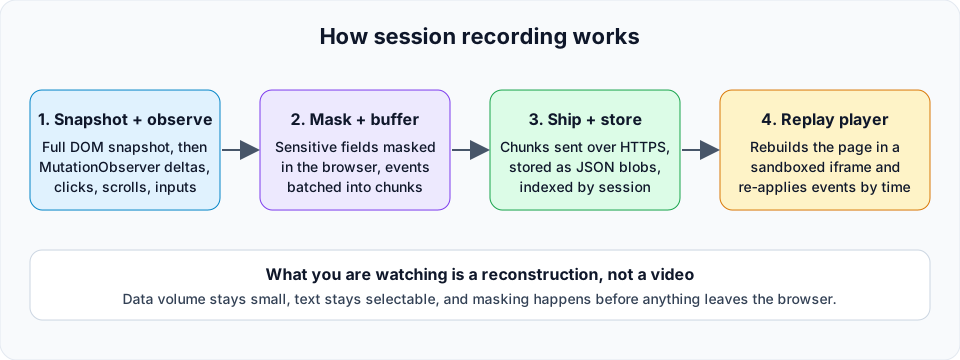
Session recording is reconstruction, not screen capture. Each stage maps to a criterion below.
Two consequences follow. First, a recording is a stream of structured events rather than video, so it is small and text stays crisp. Second, every stage is a place where vendors differ: masking happens at stage two, sampling decides what reaches stage three, and storage decides how long stage four can show you anything.
How we chose: six criteria
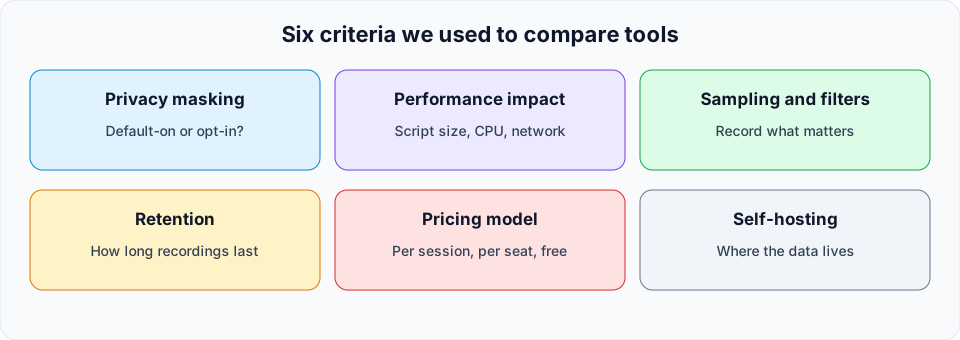
The six criteria used throughout this comparison.
1. Privacy masking. Does the tool mask text and inputs by default, or do you have to opt in field by field? Default-on masking is safer, because the failure mode of opt-in is leaking a password or card number into a recording. Also ask whether masking happens in the browser (best) or on the server.
2. Performance impact. The recorder runs on your visitors' devices. A heavier script and constant mutation capture cost CPU and bandwidth. Vendors rarely publish comparable numbers, so we do not rank on that. Test any candidate on your slowest realistic page and watch your Core Web Vitals before and after.
3. Sampling and filters. Recording every session is wasteful. Good tools let you record a percentage, trigger on a URL or event, or capture only sessions with errors or frustration signals.
4. Retention. How long a recording stays watchable. Thirty days is fine for debugging a recent release but not for quarterly research.
5. Pricing model. Per session, per seat, per feature tier, or free. Session-based pricing scales with traffic, so a viral week can blow the budget.
6. Self-hosting. Running the tool on your own infrastructure means recordings never reach a third party, which simplifies GDPR work and satisfies strict security reviews. It also means you operate it.
Comparison table
| Tool | Best for | Pricing model (verified Oct 2026) | Retention | Self-hosting | Open source |
|---|---|---|---|---|---|
| Hotjar | Marketers and UX researchers | Tiered plans; check current pricing | Varies by plan | No | No |
| Microsoft Clarity | Free, high-traffic sites | Free forever, no traffic limits | Up to 30 days | No | Client code on GitHub |
| FullStory | Product and CX analytics at scale | Free tier (30,000 sessions per month); paid Business, Advanced, Enterprise | 12 months on the free tier | No | No |
| LogRocket | Front-end debugging | Session-volume tiers, 14-day trial | Varies by plan | Enterprise option | No |
| Mouseflow | Small teams, simple pricing | Free (500 sessions per month) to Premium (100,000) | 1 to 12 months by plan | No | No |
| Smartlook | Existing customers only | End of sale May 31, 2026 | Per existing plan | No | No |
| PostHog | Product teams wanting one tool | Usage-based; generous free allowance, check current pricing | Varies by plan | Yes | Yes |
| OpenReplay | Teams needing full data control | Self-host free; cloud options | You decide | Yes | Yes (mostly AGPLv3) |
| Seentics | Privacy-first all-in-one analytics | Open source, self-hostable | You decide | Yes | Yes |
"Varies by plan" means we could not verify a single number and would rather say so than guess.
The nine tools
1. Hotjar
Hotjar is probably the best-known name in the category, and it is now part of Contentsquare (its pricing page redirects there). It pairs session recordings with heatmaps, surveys and feedback widgets, which is why marketers and designers favor it: one tool covers "where do people click" and "what do they say."
Strengths: a gentle learning curve, a combined behavior and feedback toolkit, and a large library of tutorials.
Trade-offs: plans are limited by session volume, hosting is cloud only, and it is aimed at qualitative research rather than engineering debugging. Check the current pricing page for limits, because plans and bundles have changed since the Contentsquare acquisition.
Pick it if you want an approachable all-rounder for UX research and do not need to self-host.
2. Microsoft Clarity
Clarity's pitch is hard to argue with. Per Microsoft's Clarity FAQ, it is a free service forever, with no traffic limits and no sampling. It includes session recordings, heatmaps and ML-driven insights. The tracking code is open source on GitHub, though the service itself is hosted by Microsoft.
Strengths: no cost, no caps, unlimited projects and team members. Input text is masked in all masking modes, and you can mask or unmask other content.
Trade-offs: recordings are retained for up to 30 days, so long-term research needs exports. It is cloud only. Microsoft's FAQ also notes that using recordings in consent-required jurisdictions needs valid consent, so a consent banner is part of the deal.
Pick it if you want to start watching sessions today at zero cost and 30 days of history is enough.
3. FullStory
FullStory is the heavyweight of digital experience analytics. Beyond replay it offers product analytics, funnels and AI features, with add-ons for mobile and surveys. Its pricing page lists a permanent free plan with 30,000 sessions per month and 12 months of retention, plus Business, Advanced and Enterprise tiers. It advertises a "Private by Default" approach to capture.
Strengths: polished search over sessions, strong enterprise controls, and a free tier generous enough to evaluate seriously.
Trade-offs: paid tiers are sales-led and can get expensive as traffic grows. Cloud only.
Pick it if you are a mid-size or enterprise team that wants one platform for qualitative and quantitative behavior data.
4. LogRocket
LogRocket is built for engineers. Sessions come with console logs, network requests, errors and performance data, so a replay doubles as a debugger. Per its pricing page, plans scale with captured sessions, analytics, errors and logs are unlimited, and a conditional recording option lets you capture fewer sessions to cut cost. Self-hosted deployment is listed under Enterprise.
Strengths: the best story for reproducing front-end bugs, and AI session summaries on higher tiers.
Trade-offs: priced by session volume, and self-hosting sits at the enterprise level. Marketers may find it more technical than they need.
Pick it if your main question is "why did this user hit an error?"
5. Mouseflow
Mouseflow combines recordings, heatmaps, funnels and form analytics with a simple ladder. As of our check, the pricing page lists Free (500 sessions per month, one month of retention), Essential at $25 per month (5,000 sessions, three months), Advanced at $109 per month (25,000 sessions, six months), Premium at $319 per month (100,000 sessions, 12 months), and Enterprise on request.
Strengths: transparent, predictable pricing and retention that grows with the plan.
Trade-offs: when you exhaust your monthly sessions, tracking stops until the refill date unless you upgrade, so a traffic spike can leave gaps. Cloud only.
Pick it if you are a small team that wants clear numbers and a ladder to climb.
6. Smartlook
Smartlook was a popular choice for web and mobile app replay, but the situation has changed. According to Smartlook's own notice, it was acquired by Cisco and is transitioning into Digital Experience Analytics within Splunk Observability Cloud. End of sale was May 31, 2026, contract renewals ended August 31, 2026, and the platform is scheduled to be decommissioned on September 30, 2027, with data deleted.
Pick it if you are an existing customer who needs time to migrate. For a new project, choose another tool and export your data before the shutdown.
7. PostHog
PostHog is an open source product analytics suite with session replay built in. Its docs describe replays as a DVR with a synced DevTools panel showing console logs, network requests and errors, and say you can control what gets recorded through sampling rules, feature flags and URL-based gating. Because replay lives beside analytics, flags and experiments, you can jump from a funnel drop-off straight to the sessions behind it.
Strengths: one platform for many jobs, usage-based pricing, and good filtering. It can be self-hosted, though the vendor positions its cloud as the main path.
Trade-offs: a broad product has a bigger learning curve, and usage-based billing needs monitoring. Verify the current free allowance and per-recording price on the pricing page.
Pick it if you are a product or engineering team that wants replay tied to analytics and experimentation.
8. OpenReplay
OpenReplay is a purpose-built open source replay platform. According to its GitHub repository, the codebase is mostly AGPLv3 with some MIT directories and proprietary enterprise features. It can run on AWS, Google Cloud, Azure, Kubernetes, Docker or bare metal, with a stated minimum of one VM (2 vCPUs, 8 GB RAM, 50 GB storage). It emphasizes capture-time sanitization, so PII can be masked before it reaches your servers, and it also offers cloud hosting.
Strengths: strong developer tooling, full data control, and a focus squarely on replay and debugging.
Trade-offs: self-hosting means you run, patch and scale it, and the AGPL license deserves a read from your legal team.
Pick it if you need replay with developer context and want it on your own infrastructure.
9. Seentics
Seentics is open-source, privacy-first web analytics that you can self-host. Session replays are one part of a single product: they use rrweb and come with rage-click and JavaScript error detection, so frustrating sessions are surfaced instead of buried in a list. Around that sit real-time dashboards, heatmaps (click, scroll depth and screenshots), funnels with drop-off rates, revenue and UTM attribution, events and goals, behavioral automations, and natural-language AI queries. It uses no cookies and no fingerprinting.
We built it, so weigh this section accordingly. The reasoning for a combined tool is that replays are most useful when you arrive from a question. A funnel step with a sharp drop-off, a spike of rage clicks, or a new JavaScript error is a much better starting point than browsing recordings at random.
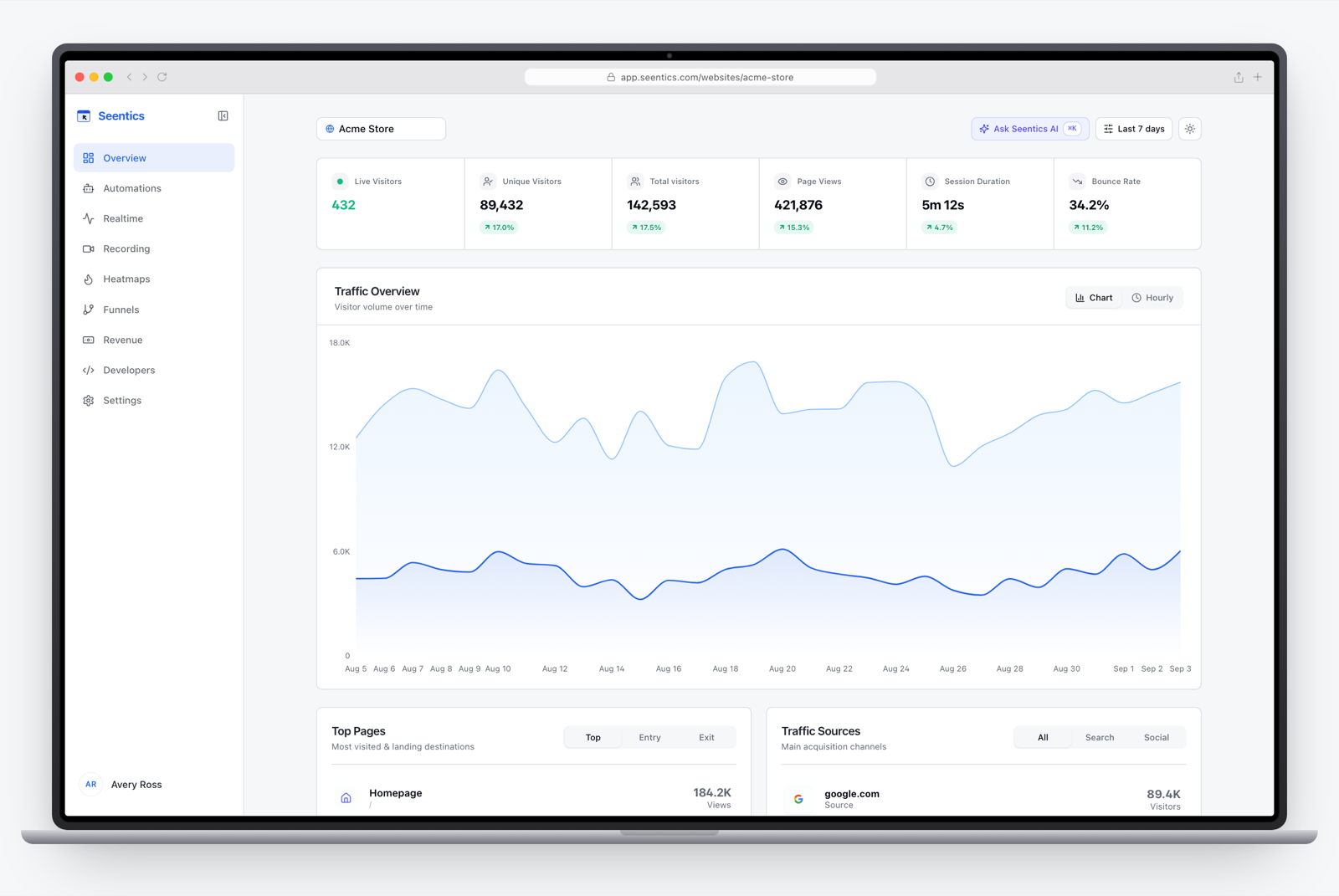
The Seentics dashboard, where replays sit alongside analytics, funnels and heatmaps.
Strengths: open source and self-hostable, replay and analytics in one product, no cookies, and frustration signals built in. See privacy-first analytics and self-hosted analytics for the broader reasoning.
Trade-offs: it is a younger product than Hotjar or FullStory, so it lacks their depth of enterprise integrations and survey tooling. Self-hosting also means running your own infrastructure.
Pick it if you want replay, heatmaps and funnels in one open-source tool and care about where the data lives. You can try the live demo without signing up.
Which should you choose?
A quick decision path:
- Need free and unlimited? Clarity, then decide whether 30-day retention hurts.
- Debugging production bugs? LogRocket, PostHog or OpenReplay.
- Qualitative UX research with surveys? Hotjar or Mouseflow.
- Strict privacy or data residency? Self-host Seentics or OpenReplay. See our guide to GDPR analytics without a cookie banner for the legal angle, and keep in mind that recording can still need consent depending on what you capture and where your visitors are.
- Enterprise scale with dedicated analysts? FullStory.
- Replay connected to a product analytics suite? PostHog or Seentics.
What to look for in a session
Once a tool is installed, the skill is watching efficiently. Fifty random recordings are mostly noise. Start from a signal.
Filter first. Watch sessions that match a question: visitors who reached checkout but did not purchase, sessions with a JavaScript error, sessions from one browser, or sessions with rage clicks. Skip anything with under ten seconds of activity.
Look for these patterns:
- Rage clicks and dead clicks: repeated clicks on something that does nothing signal a broken or misleading element.
- U-turns: a visitor moves forward, then immediately backward, which often means the page did not match what they expected.
- Hesitation: long pauses before a form field or price usually mark confusion or doubt.
- Form struggle: retyping, tabbing back and forth, or abandoning on a specific field.
- Scroll stops: where people stop reading, especially if an important button sits below that line.
- Errors in context: a failed request or exception right before the user gives up.
- Mobile mismatches: tap targets that are too small or a keyboard covering a button.
Watch in batches. Take 10 to 15 sessions for one segment, write down each issue, and count repeats. One person struggling is an anecdote; five struggling in the same place is a finding. Then confirm with numbers, such as a funnel or a heatmap, before changing the design.
Protect people while you watch. Limit who can view recordings, avoid sharing sessions outside the team, and never record sensitive fields. If you see personal data in a replay, fix the masking rule that missed it right away.

Photo: Unsplash. Reviewing sessions in batches turns anecdotes into patterns.
Common mistakes when adopting session recording
- Recording everything forever. More data means more cost, more privacy exposure and more noise. Sample and set a retention policy.
- Skipping the masking audit. Open a few test recordings and look for emails, addresses and tokens in the replay and in URLs.
- Not checking performance. Compare page speed before and after install on real devices.
- Treating replay as a dashboard. It answers "why," not "how many." Pair it with analytics.
- Ignoring consent. Recordings can capture behavior that regulations treat seriously. Get legal advice for your situation.
FAQ
What is the best free session recording software?
Microsoft Clarity is the usual answer, since Microsoft says it is free forever with no traffic limits. FullStory, Mouseflow and PostHog also offer free allowances, and Seentics and OpenReplay are free to self-host if you cover your own infrastructure.
Does session recording slow down my website?
It adds some work, because the script observes DOM changes and sends data, but good tools batch events and run off the main path as much as possible. Impact depends on your page and the tool, so measure Core Web Vitals before and after rather than trusting claims.
Is session recording legal under GDPR?
It can be, but it is personal-data processing that needs a legal basis, usually consent, plus masking of sensitive fields and a clear privacy notice. Self-hosting reduces third-party transfers but does not remove your obligations. This is not legal advice.
Are session recordings videos?
No. Most tools record DOM snapshots and events and rebuild the page in a player. That keeps files small and lets masking happen in the browser before data is sent.
What is the difference between session recording and heatmaps?
A recording shows one visit in sequence; a heatmap aggregates many visits into where people click and scroll. Use heatmaps to spot a problem area and recordings to understand it. See heatmaps explained.
Should I self-host session replay?
If you handle sensitive data, face strict security reviews, or want full control of retention, yes. If you have no one to run infrastructure, a managed cloud tool is more practical.
Try it yourself
If you want replay, heatmaps and funnels in an open-source tool you can self-host, explore the Seentics demo or browse the code on GitHub. Whichever tool you choose, start with one question, watch a handful of sessions, and fix the first thing you see.