Hotjar Alternatives: 9 Options With Session Replay and Heatmaps (2026)
Looking for Hotjar alternatives? Compare 9 session replay and heatmap tools, from free Clarity to open-source Seentics, with pricing notes and a migration checklist.
Hotjar Alternatives: 9 Options With Session Replay and Heatmaps (2026)
Hotjar taught a generation of marketers and designers that you can watch real visitors struggle with your site, and that a heatmap can end an argument in a meeting. It is still a perfectly good product. But if you are reading this, something has probably nudged you to look at Hotjar alternatives: a bill that grew faster than your traffic, a privacy review that asked where the recordings live, or a realization that replays and heatmaps sit in a different tool than your funnels.
This guide compares nine options (Microsoft Clarity, Mouseflow, Smartlook, Lucky Orange, Crazy Egg, Fullstory, PostHog, OpenReplay and Seentics), explains where each one fits, and ends with a migration checklist and a decision diagram. Comparisons are as of October 2026, and we link the vendor pages we checked.
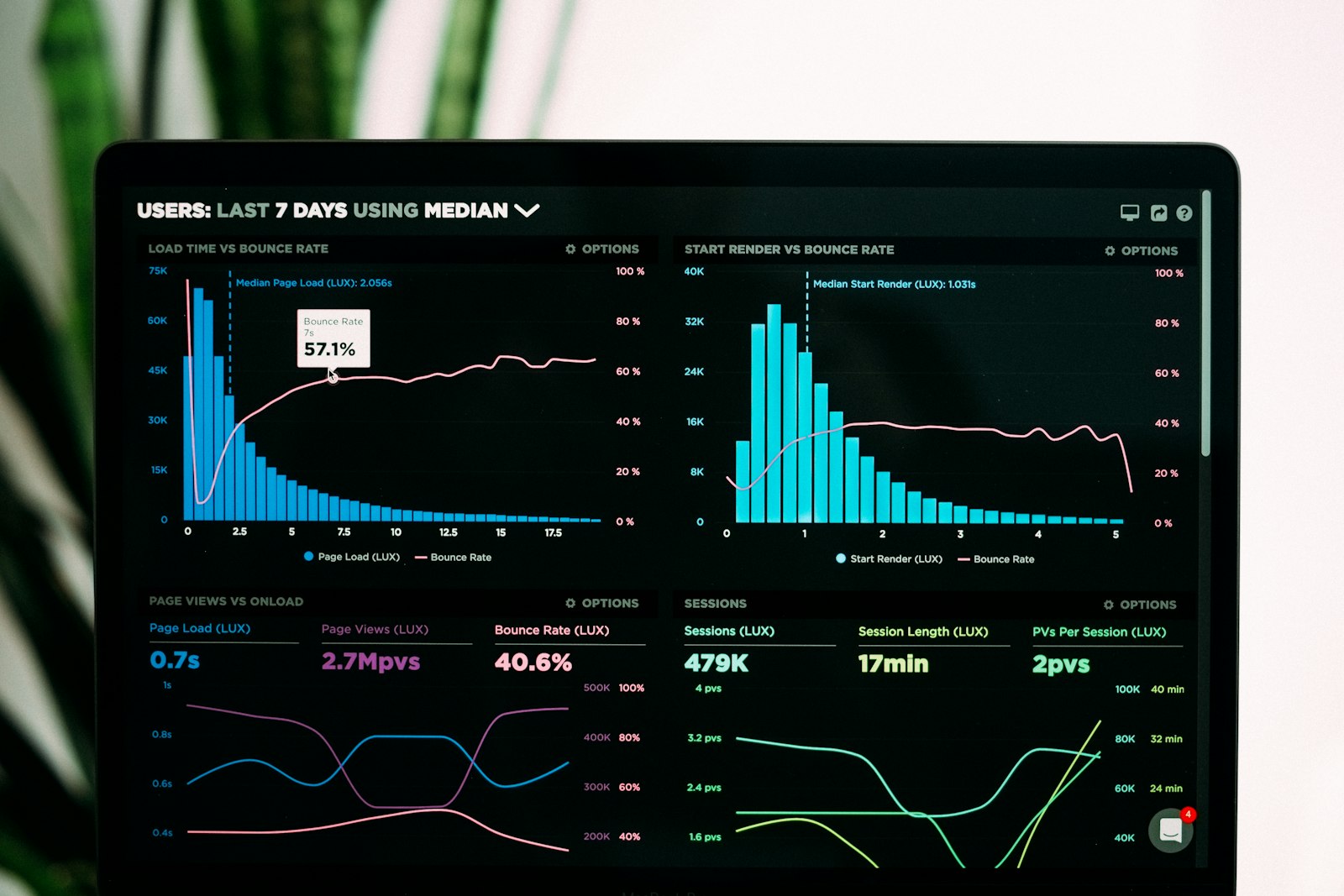
Photo from Unsplash.
TL;DR
- Want free and simple: Microsoft Clarity offers session recordings and heatmaps and describes itself as free forever with no traffic limits.
- Want a traditional paid replacement: Mouseflow, Lucky Orange and Crazy Egg all bundle recordings and heatmaps at published monthly prices.
- Want replay inside a product analytics suite: PostHog or Fullstory.
- Want to own your data: OpenReplay and Seentics are both open source and can be self-hosted.
- Skip Smartlook for a new rollout. Its vendor announced end of sale on May 31, 2026.
- Pick two, run them side by side for two weeks, and judge by what you actually fix.
Why people leave Hotjar
Hotjar is now part of Contentsquare (its old pricing URL redirects to Contentsquare's pricing page), and it remains a polished tool. The reasons teams look elsewhere tend to fall into four buckets.
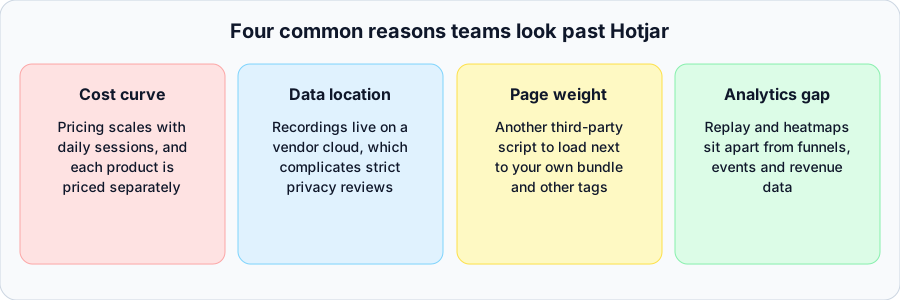
Four common reasons teams look past Hotjar. These are patterns, not claims about any one account.
1. The cost curve
Hotjar prices its Observe product (heatmaps and recordings) by daily sessions, with a free Basic tier and paid Plus, Business and Scale tiers, and it prices companion products such as Ask (surveys) and Engage (interviews) separately. Third-party roundups put the free tier at 35 daily sessions and paid tiers starting in the low tens of dollars a month, but we could not load Hotjar's own pricing page to confirm current figures, so check them directly before you decide.
The structural point is more important than any number. When pricing is tied to sessions, a traffic spike or a successful campaign raises the bill. When you want surveys and recordings, you may be buying two subscriptions. Teams with spiky or fast-growing traffic feel this first.
2. Privacy and consent
Any tool that records sessions processes visitor behavior, and in many jurisdictions that means you need to think about consent, masking of sensitive fields and where the data is stored. Hotjar, like most hosted replay tools, stores recordings on the vendor's infrastructure. That is a normal arrangement, but it means your legal and security teams review a processor, not just your own systems. If your organization requires data to stay in its own environment, a hosted tool is a harder sell. We could not retrieve Hotjar's privacy documentation during research, so read its current data processing terms rather than relying on our summary.
For background on the consent side, see our post on GDPR analytics without a cookie banner and our overview of privacy-first analytics.
3. Page weight
Every third-party script competes with your own code and other tags for bandwidth and main-thread time. Replay tools in particular observe the DOM and send data continuously. We did not benchmark Hotjar's script, and we are not claiming it is heavier than the alternatives; all replay tools add some cost. The practical advice is to measure: load your site with and without the snippet and compare using your own performance tooling before committing.
4. Replays and heatmaps in a silo
Seeing that visitors rage-click on a button is useful. Knowing how many of them were in your checkout funnel, which campaign sent them, and what revenue they were worth is what gets the fix prioritized. If your behavior tool does not connect to funnels, events and revenue, someone ends up stitching exports together. This is a big reason product teams move to suites. Our conversion rate optimization guide covers that workflow.
What to look for in a replacement
Before the list, decide which of these matter. They separate the nine tools more than feature checklists do.
| Question | Why it matters |
|---|---|
| How is usage priced (sessions, pageviews, events)? | Determines how your bill reacts to growth. |
| Can you self-host? | Decides where recordings live. |
| Are heatmaps and replay both included? | Some tools are replay-first, some heatmap-first. |
| Does it connect to funnels and events? | Turns observations into prioritized fixes. |
| How is sensitive data masked? | Passwords, payment fields and personal data should never be recorded. |
| Is the vendor stable? | Acquisitions and end-of-sale notices happen, as Smartlook shows. |
The 9 Hotjar alternatives
1. Microsoft Clarity
Clarity is the obvious starting point if budget is the constraint. Microsoft's page says it is free forever with no limits on traffic, and it offers session recordings, heatmaps, AI summaries and mobile app support (Android, iOS, Flutter and React Native). It describes itself as GDPR and CCPA ready; read its data privacy page for what that means for your consent setup.
Best for: small teams, content sites and anyone who wants recordings and heatmaps with no invoice. Trade-off: it is a hosted Microsoft service, so it does not solve data-location requirements, and it is not a full product analytics suite.
2. Mouseflow
Mouseflow bundles session replay, heatmaps, funnels, form analytics, feedback and friction detection. Its published plans at the time of writing: Free (500 sessions per month, one site, one month retention), Essential at $25 per month (5,000 sessions), Advanced at $109 per month (25,000 sessions, six months retention), Premium at $319 per month (100,000 sessions) and a custom Enterprise tier.
Best for: marketers who want one tool with form analytics and a clear tier ladder. Trade-off: session caps mean you must pick a sampling strategy as traffic grows.
3. Smartlook
Smartlook's own site now announces that Cisco acquired it and that it is moving into Digital Experience Analytics within Splunk Observability Cloud. The listed dates: end of sale on May 31, 2026, end of renewals on August 31, 2026, last day of support on August 31, 2027, and decommissioning on September 30, 2027. Existing customers can keep using it until their plan expires.
Best for: current customers who need time to plan an exit. Trade-off: it is not a sensible choice for a new setup. If you use Smartlook today, export your data and plan a migration with the checklist below.
4. Lucky Orange
Lucky Orange lists annual-billing plans of Build at $32 per month (3,500 sessions), Grow at $72 (10,000), Expand at $199 (50,000), Scale at $839 (300,000) and a custom Enterprise tier, with a 7-day free trial. It says every feature is available on every plan, including recordings, dynamic heatmaps, funnels, form analytics, surveys, live chat and visitor view, and unlimited team members.
Best for: small ecommerce and lead-gen sites that like live chat and live visitor view alongside replays. Trade-off: a lot of features in one tool means a busier interface than a replay-only product.
5. Crazy Egg
Crazy Egg is the heatmap-first option, with recordings and A/B testing added. Listed plans, billed annually: Starter at $29 per month (5,000 pageviews, 50 recordings), Plus at $99 (150,000 pageviews, 1,000 recordings), Pro at $249 (500,000 pageviews, 5,000 recordings) and Enterprise at $599 (1,000,000 pageviews, 10,000 recordings). All include unlimited domains and team members.
Best for: CRO and landing-page work where snapshots and A/B tests matter more than watching many sessions. Trade-off: recording allowances are small compared with replay-first tools.
6. Fullstory
Fullstory positions session replay inside digital experience and product analytics. It has a permanent free plan with 30,000 sessions per month, 12 months of retention and up to 10 users; paid Business, Advanced and Enterprise tiers add deeper analytics, with pricing available on request. Add-ons include mobile analytics, AI features, guides and surveys.
Best for: larger product and CX teams that want replay tied to behavioral analytics and are comfortable with sales-led pricing. Trade-off: more platform than a team who only wants "watch the recording" needs.
7. PostHog
PostHog is a product analytics platform where session replay is one of several products. Replays carry user properties and feature flags, show a synced DevTools panel with console logs, network requests and errors, and PostHog advertises a free monthly recordings allowance, heatmaps, open-source deployment and self-hosting. We could not read its pricing tables, so confirm the current allowance and pricing basis on its pricing page.
Best for: engineering-led product teams that want replay, events, feature flags and experiments in one place. Trade-off: breadth means more setup and a larger surface area than a focused replay tool.
8. OpenReplay
OpenReplay is an open-source session replay platform you can self-host. The repository describes session replay with DevTools (network, console, JavaScript errors, performance metrics), product analytics including funnels, trends, journeys and heatmaps, cobrowsing, and native replay for iOS, Android and React Native. Most of the code is AGPLv3, some directories are MIT, and the Enterprise Edition has a separate commercial license. Its pricing page lists a free open-source self-hosted option, a managed Dedicated plan starting at $199 per month, and a custom Enterprise tier.
Best for: engineering teams who want developer-centric replay with debugging context and full control over where data lives. Trade-off: self-hosting means you run and maintain it.
9. Seentics
Seentics is the one we build, so weigh this entry accordingly. It is open-source (AGPL v3), self-hostable, privacy-first web analytics that works without cookies or fingerprinting. Behavior tools sit alongside the analytics rather than in a separate product:
- Session replays recorded with rrweb, with rage-click and JavaScript error detection.
- Heatmaps: click maps, scroll depth and captured page screenshots.
- Funnels with drop-off rates, plus events, goals (including CSS-selector conversions) and revenue and UTM attribution.
- Behavioral automations and natural-language AI queries over your data.
Installation is a single tracker snippet, <script defer src=".../trackers/seentics.js" data-website-id="...">, and a small JavaScript API (seentics.track, identify, page, flush) for custom events.
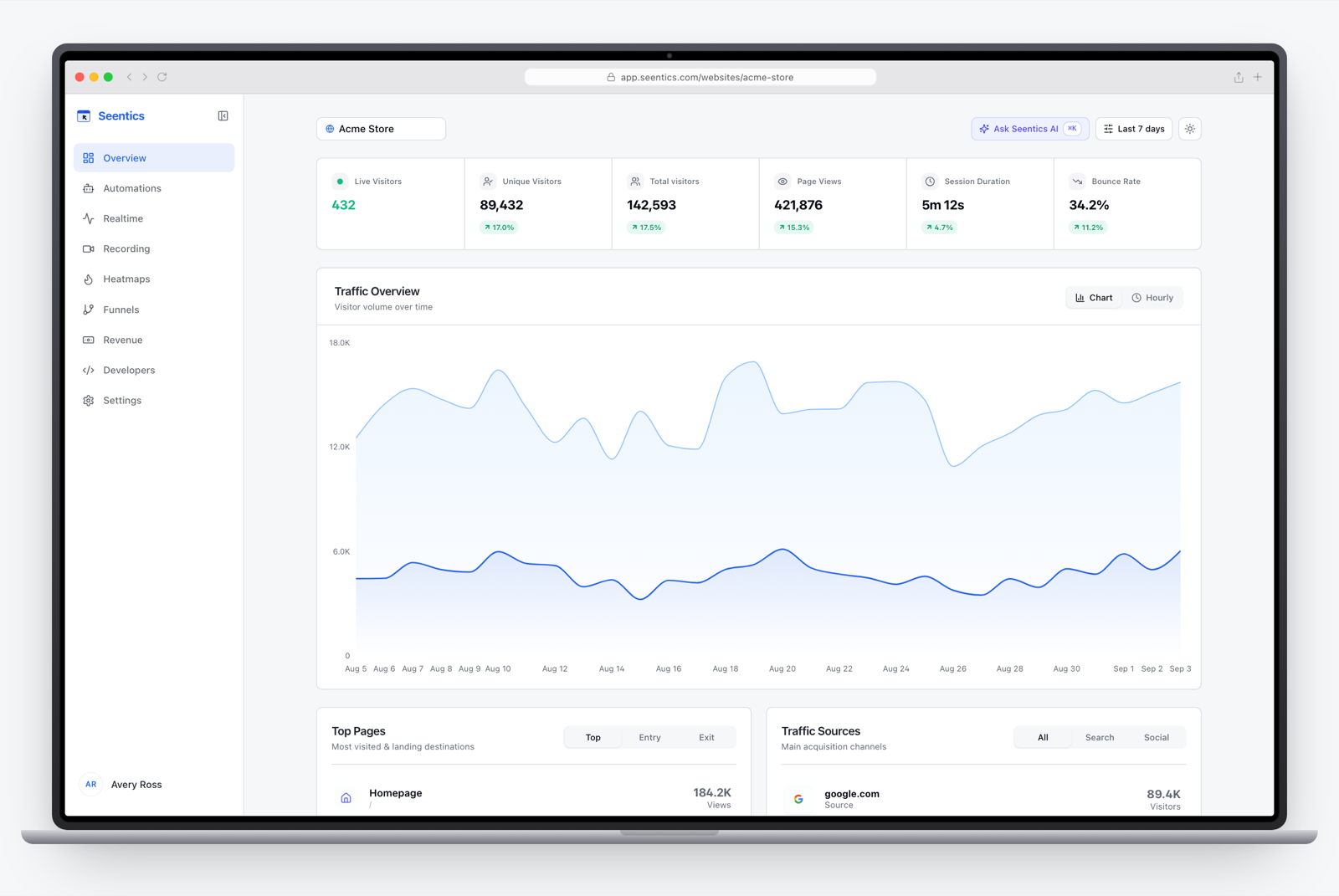
The Seentics dashboard.
Best for: teams who want replays, heatmaps, funnels and revenue in one tool they can self-host, with a privacy posture that does not depend on cookies. Trade-off: it is a younger project than the incumbents here, so check that its feature set covers your specific needs (for example, we do not claim parity with surveys or live chat tools). You can try the live demo before installing anything.
For how replay and heatmaps work in practice, see our session replay guide, heatmaps explained and rage clicks explained.
Comparison table (as of October 2026)
Prices and limits are what each vendor listed when we checked, and they change. "Not verified" means we could not read it on the official page.
| Tool | Replay | Heatmaps | Free option | Self-host | Pricing basis |
|---|---|---|---|---|---|
| Microsoft Clarity | Yes | Yes | Free, no stated traffic limit | No | Free |
| Mouseflow | Yes | Yes | 500 sessions per month | No | Monthly sessions, from $25 |
| Smartlook | Yes | Yes | Free plan until Sept 30, 2027 for existing customers | No | Closed to new sales |
| Lucky Orange | Yes | Yes | 7-day trial | No | Monthly sessions, from $32 (annual) |
| Crazy Egg | Yes | Yes | Trial (per vendor) | No | Pageviews and recordings, from $29 (annual) |
| Fullstory | Yes | Not verified | 30,000 sessions per month | No | Sales-led for paid tiers |
| PostHog | Yes | Yes | Free monthly allowance | Yes | See vendor page |
| OpenReplay | Yes | Yes | Self-hosted open source | Yes | Free self-hosted; managed from $199 |
| Seentics | Yes | Yes | Self-host freely (AGPL v3) | Yes | See project README |

Photo from Unsplash.
Which one for which team
The diagram below is a first filter. It will not replace a trial.
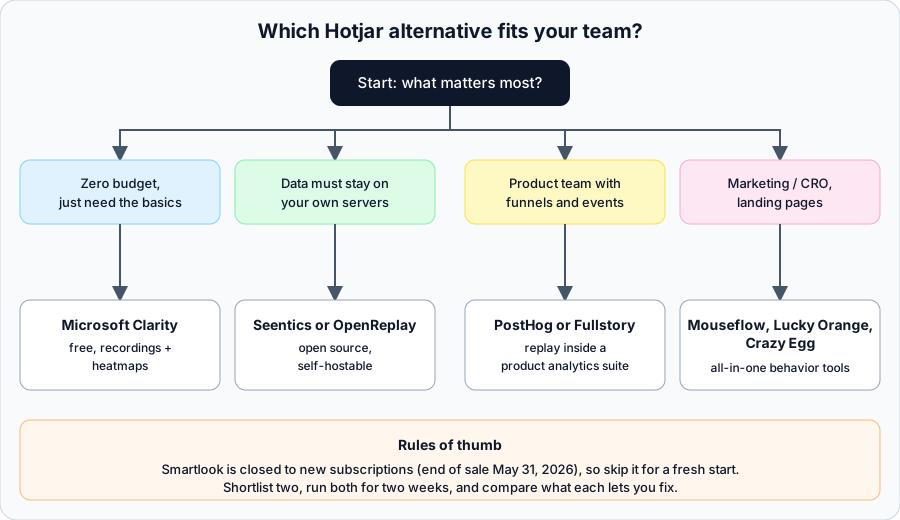
A decision diagram: pick the branch that matches your biggest constraint.
A few notes on reading it:
- Solo founder or small content site: start with Clarity, and revisit when you hit its limits or need data ownership.
- Agency managing many clients: look at plans that allow multiple sites and unlimited team members (Lucky Orange and Crazy Egg advertise unlimited team members), or a self-hosted tool you can run once. Our analytics for agencies post covers the trade-offs.
- SaaS product team: PostHog, Fullstory or a self-hosted stack with funnels, as in our SaaS onboarding analytics guide.
- Regulated or privacy-sensitive organization: a self-hostable option (OpenReplay, Seentics, PostHog) removes one third-party processor from the picture, though you still must configure masking and consent correctly.
- Ecommerce: replays on the cart and checkout matter most; see ecommerce analytics.
Migration checklist
Moving off Hotjar is mostly an exercise in not losing the questions you were using it to answer.
- Inventory what you use. List the heatmaps, recording filters, surveys and feedback widgets that people actually open. Many teams find they use two of them.
- Export what you can. Download or screenshot key heatmaps and note the insights they produced. Recordings are rarely portable, so save the clips you care about.
- Check consent and notices. Update your privacy policy and cookie or consent configuration for the new vendor, and decide whether replay is gated behind consent.
- Set masking rules first. Mask or block password, payment and personal-data fields before turning recording on.
- Install the new snippet in parallel. Run the old and new tools on the same pages for one to two weeks so you can compare.
- Re-create key segments. Rebuild the filters you relied on, such as rage clicks, errors, checkout abandoners and traffic by campaign.
- Measure page performance. Compare load metrics with each snippet enabled using your own tooling.
- Brief the team. Share where the new tool lives, how to find recordings, and which two or three views replace the old workflow.
- Remove the old snippet and cancel. Only after the parallel run confirms nothing is missing. Remove the script from every template, tag manager container and staging site.
Our user journey mapping post helps with step 6 if you need to decide which views to rebuild.
FAQ
What is the best free alternative to Hotjar?
Microsoft Clarity is the most generous on paper: its site says it is free forever with no traffic limits, and it includes recordings and heatmaps. Mouseflow and Fullstory also have free tiers with session caps, and open-source tools such as OpenReplay and Seentics are free to self-host (you pay for your own infrastructure).
Is there an open-source Hotjar alternative?
Yes. OpenReplay, PostHog and Seentics are all open source and self-hostable. Their licenses differ (OpenReplay is mostly AGPLv3 with some MIT and a commercial Enterprise Edition; Seentics is AGPL v3), so read the license if you plan to modify and redistribute the code.
Can I use a session replay tool and stay GDPR compliant?
Compliance depends on your configuration, not only the tool: lawful basis or consent, masking of sensitive data, retention, and the data processing agreement with your vendor. Self-hosting can simplify the vendor side. Talk to your legal counsel; this article is not legal advice.
Will a replay tool slow down my site?
Any added script has a cost, and replay tools observe page changes continuously. We did not benchmark any of these tools. Test on your own pages with the snippet on and off.
Should I use heatmaps or session replay?
They answer different questions. Heatmaps show aggregate patterns on one page (where people click and how far they scroll), while replays show individual journeys and explain odd patterns. Most teams want both, which is why we cover them separately in heatmaps explained and the session replay guide.
Do I have to migrate all at once?
No. Run the new tool in parallel on a few key pages, compare, then roll it out and remove the old snippet.
Try one this week
The best way to choose is to put two tools on the same pages and see which one helps you fix something real. If you want to see what Seentics replays, heatmaps and funnels look like before installing anything, open the live demo, or read the code and self-hosting instructions on GitHub.